How TikTok’s algorithm *actually* works (2026)

Learn how the TikTok algorithm works in 2026. These practical tips will help social media teams improve reach, show up in search, and grow their community on TikTok.
You might have heard that TikTok is now also a search engine.
And you heard right! People are using TikTok to look up tutorials, product recommendations, social media advice, and quick “how-to” guides.
And as of 2026, short-form videos are increasingly appearing in AI-powered search tools like ChatGPT and Google Gemini through dedicated “short video” results.
Take a look at this example from my Google search “Fish Facts”:
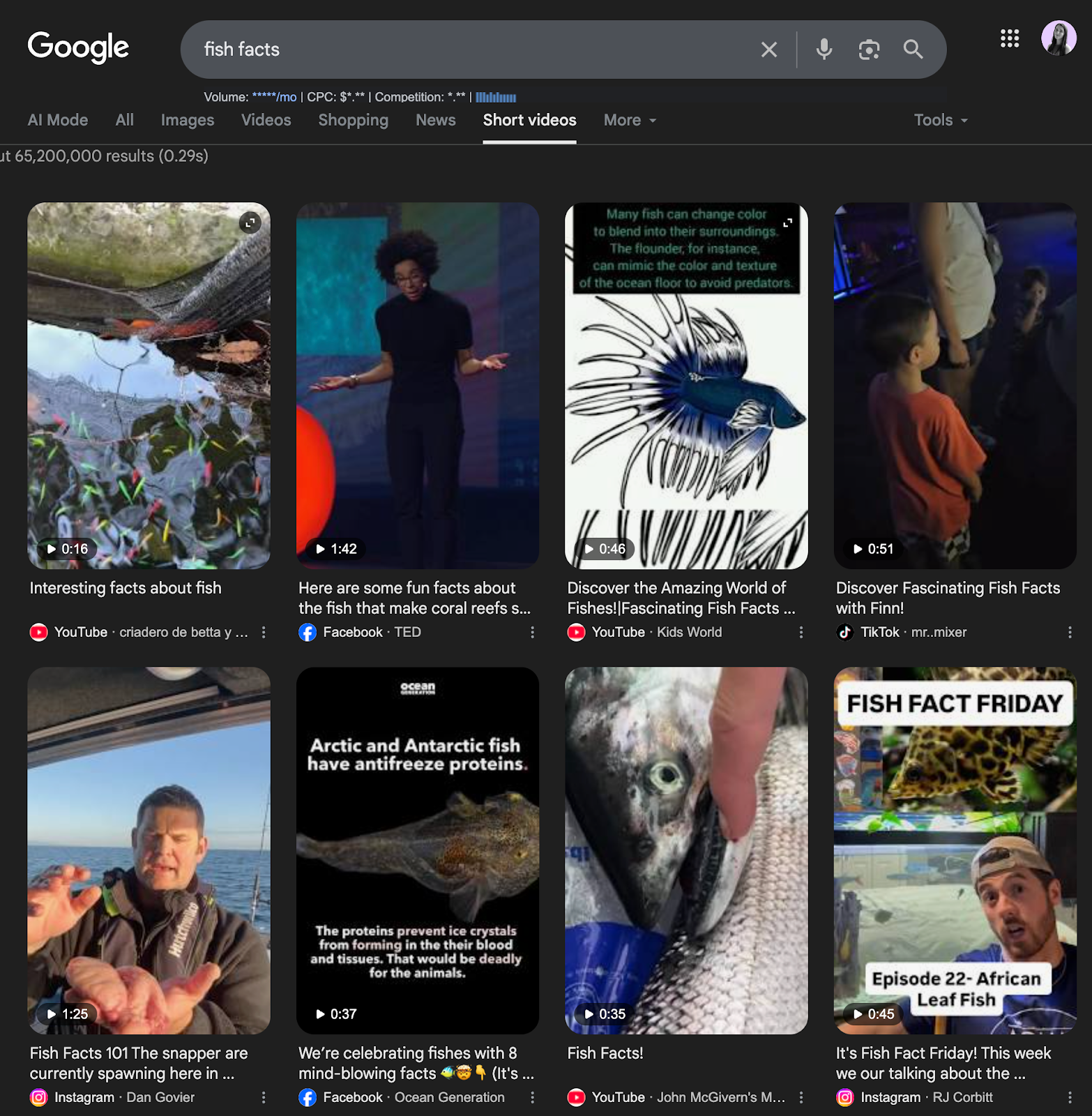
Cool, right? Now, when I search “fish facts,” short-form videos pop up from creators on TikTok, Facebook, Instagram, and YouTube Shorts who’ve posted about that topic.
This is the new “Short videos” tab that appears when you Google something. This is a pretty big deal because it means your TikTok videos aren’t only competing for attention on the For You Page anymore – they’re also competing for search visibility across multiple platforms.
Here are a few small changes you can make to start ranking in TikTok’s 2026 algorithm.
Create videos that can rank in search
TikTok now behaves a lot like a search engine nowadays (as shown in my “fish facts” example earlier). People are searching for very specific things because they want quick answers – ideally from a real person.
Some common searches look like:
- “marketing tips”
- “best travel spots in Italy”
- “how to edit TikTok videos”
- “social media strategy advice”
So when you’re creating a video, think about what question you're answering.
The clearer the answer is, the easier it is for TikTok to understand your content and show it to the right people.
To help TikTok categorize your video, say your keyword out loud, add it to on-screen text, and include it in your caption.
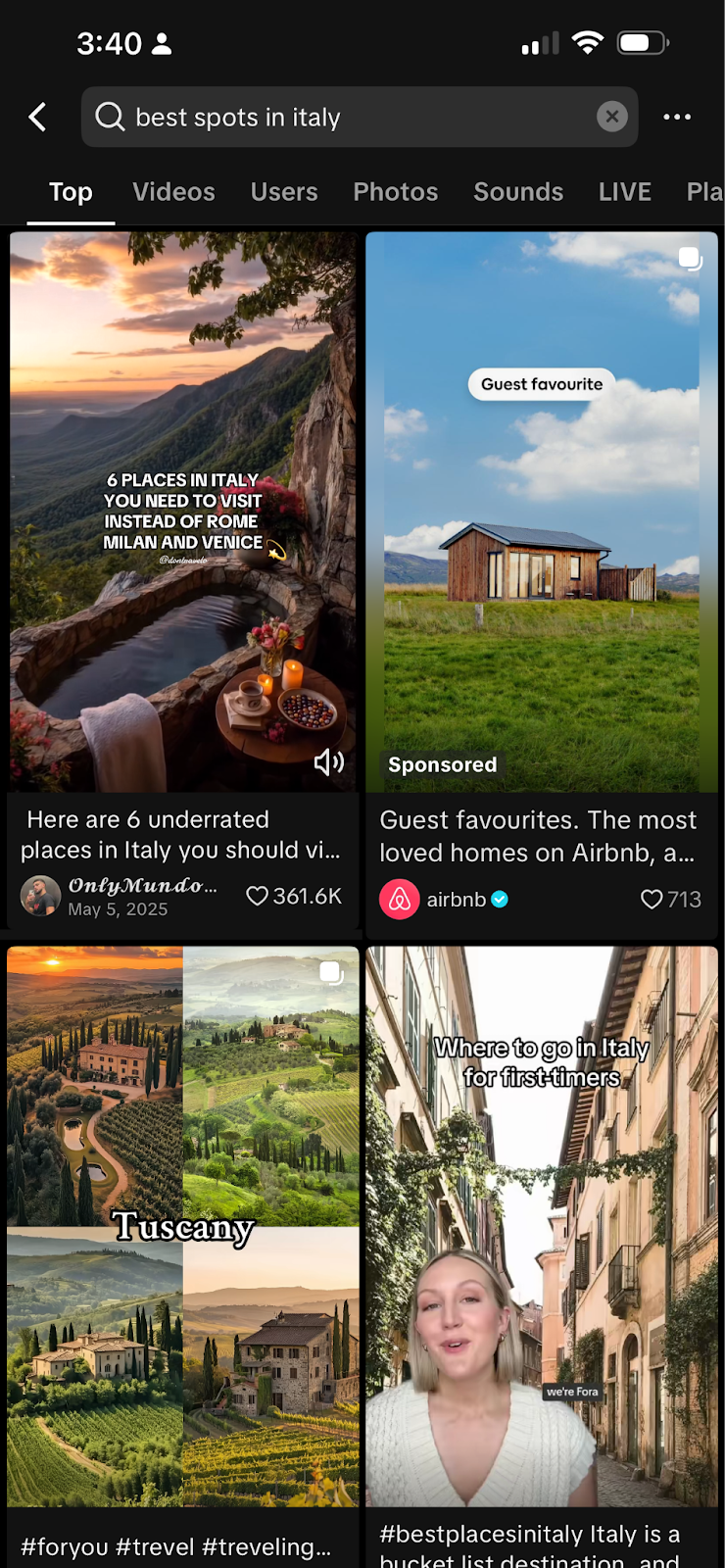
The more obvious your topic is, the easier it is for TikTok to show your video to the right audience!
Optimize your TikTok profile
One of the most overlooked parts of TikTok (and honestly, most social platforms) is the profile itself. Think of it like a cover on a book – you need to be clear to the algorithm who you are and what you offer before it can figure out who to serve your content to.
A strong profile usually includes:
- a clear username
- a display name with searchable keywords
- a bio that explains what people will learn by following you
Take a look at creator Mike the Credit Guy:
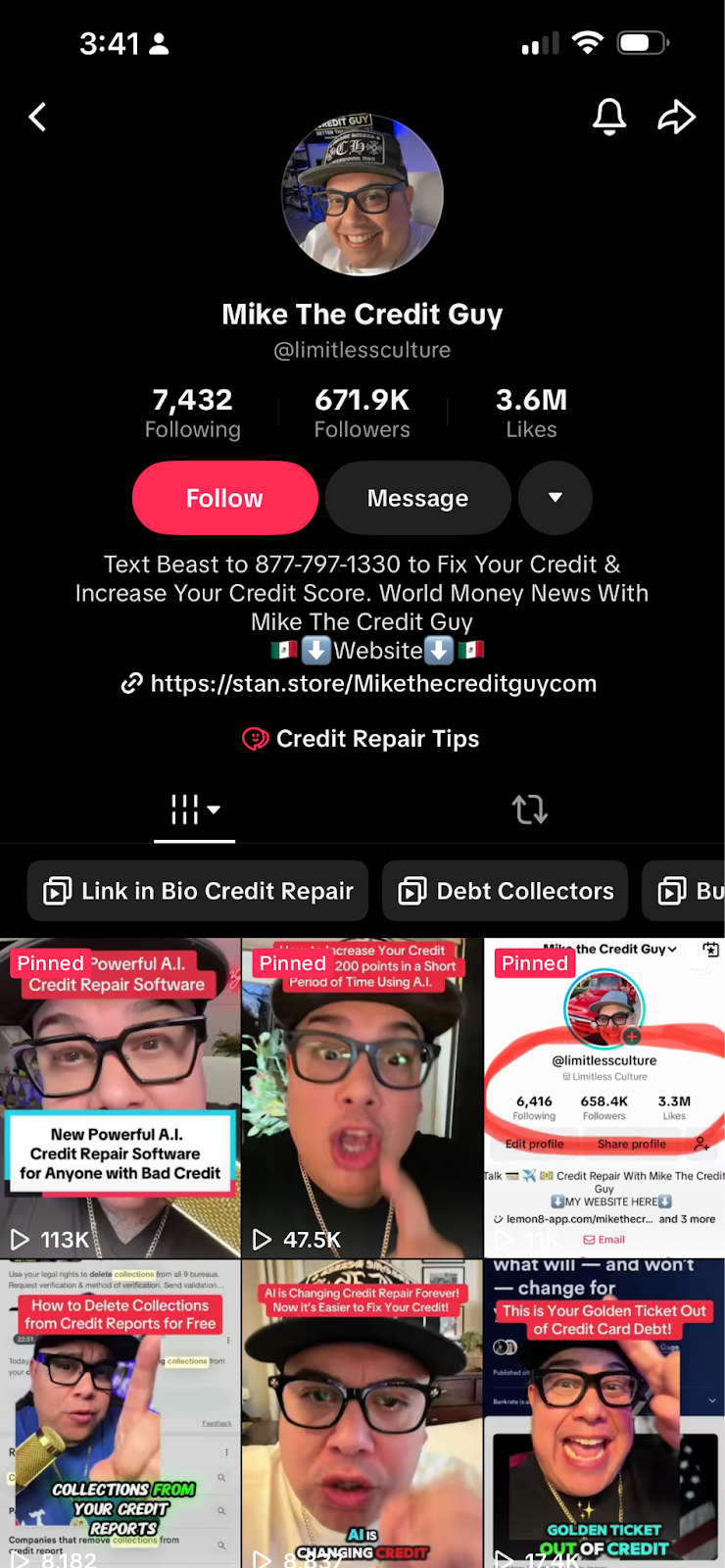
His name is clear, who he is, “Mike,” and what he does, “Credit.”
It is even clearer in his bio, which adds extra content. Mike helps you: “Fix your credit & increase your credit score,” and he shares: “world money news.”
Now it’s clear to the algorithm and us who he is, and if his content is being delivered to people who are interested in tax and credit content.
Clarity helps both the algorithm and new viewers understand your niche. In other words, you want to be clear for both humans and robots.
Use 3 relevant hashtags
Hashtags still help TikTok categorize your content, but adding too many can dilute the signal.
Many creators are now seeing better results when they stick to three highly relevant hashtags instead of long lists.
Instead of this: #fyp #viral #trend #creator #socialmedia
Try something more focused: #tiktoktips #socialmediamarketing #tiktokgrowth
This will help TikTok understand who your content is actually for.
Pay attention to text placement
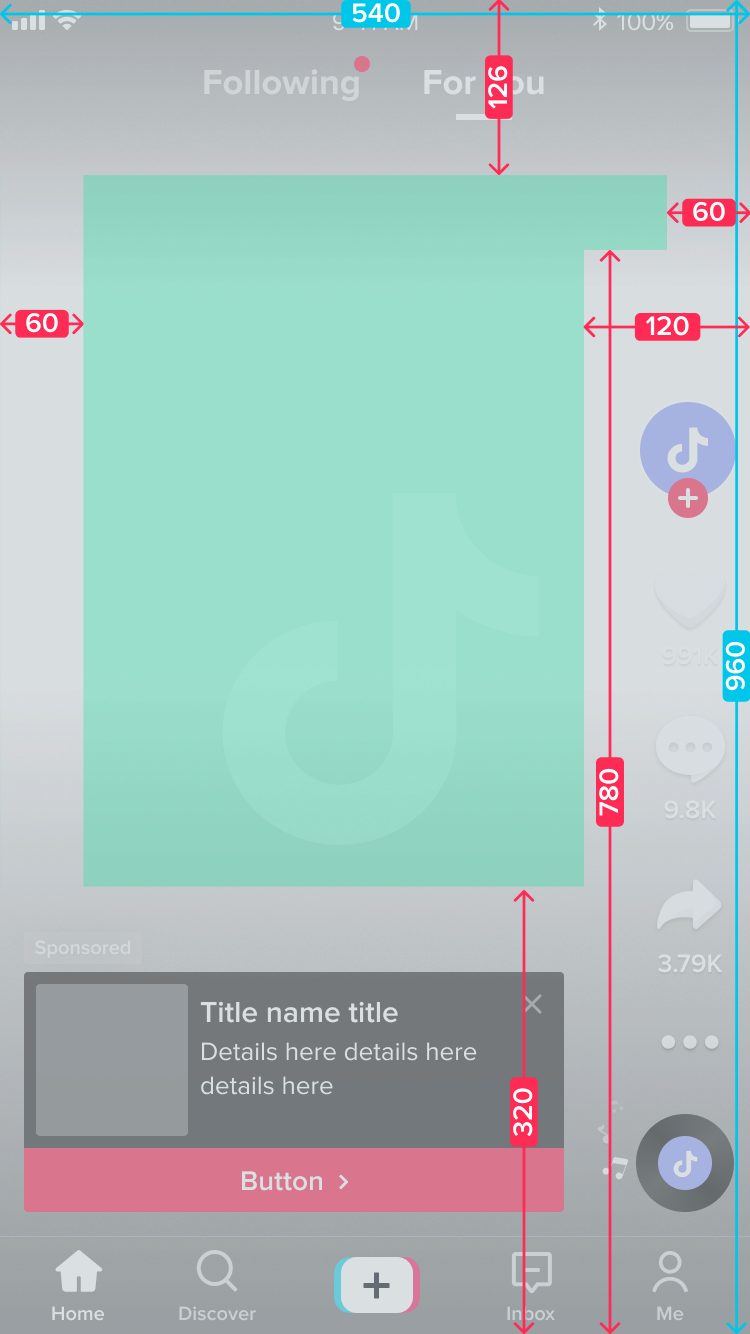
Another detail that often gets overlooked is where your text appears on screen.
TikTok’s interface includes several elements on the screen — like the caption, search features, and engagement icons. If your text overlaps with those areas, it can be harder to read.
A few simple best practices for TikTok:
- Placing text above your head or near your chin
- Avoiding the right side of the screen
- Keeping text large enough for mobile viewing
Small adjustments like this can improve readability and help viewers stay focused on your video.
Also, don’t forget to add captions! They improve accessibility and help people who watch videos without sound (like me!).
Keep text styling simple
If you look closely at high-performing TikTok videos, you’ll notice something interesting. The text styling is usually very simple.
Common combinations include:
- White text with a black outline
- Black text on a white background
- White text on a red background
These combinations make content quick and easy to read, which matters when viewers are scrolling quickly.
Avoid posting videos with watermarks
TikTok can detect when videos were downloaded from other platforms.
If your video includes watermarks from apps like Instagram or YouTube Shorts, it may reduce how widely your video is distributed.
If you’re repurposing content:
- Export the original video file
- Upload it directly to TikTok
- Avoid platform branding when possible
Repurposing content works best when the video still feels native to TikTok.
Add a clear call-to-action at the end
I’ll admit . . . this is something I forget sometimes.
But the final seconds of your video are valuable, so it’s worth remembering. If someone watches until the end, TikTok already sees that as a strong engagement signal. A call-to-action (CTA) simply encourages the next step.
Try CTAs like:
- “Follow for more TikTok tips.”
- “Save this for later.”
- “Comment ‘guide’ if you want the template.”
Keeping your CTA in the last few seconds helps maintain viewer retention while still encouraging engagement.
Reply to comments and engage with your community
Engagement doesn’t stop once you post a video. Replying to comments shows TikTok that your content is generating conversation. It also helps strengthen your relationship with your community
When someone comments, and you respond, it signals that this creator is active and people care about what they’re posting. And when someone sees you replied to them, they usually open the video again — which can lead them to watch more of your content.
Over time, that interaction can extend the life of your videos and increase long-term reach.
Learn from creators in your niche
You don’t need to reinvent TikTok every time you post. Sometimes the smartest thing you can do is simply observe what’s already working.
Look at creators or brands in your niche and ask yourself:
- What hooks do they use?
- How quickly do they get to the point?
- Which topics generate the most comments?
- How long are their videos?
Studying these patterns can help you create content that aligns with what audiences already enjoy.
FAQs
How does the TikTok algorithm work in 2026?
The TikTok algorithm prioritizes content based on watch time, engagement, and viewer relevance. Videos that people watch until the end, comment on, or rewatch are more likely to reach larger communities. TikTok also analyzes captions, on-screen text, and keywords to understand what your video is about.
Does TikTok SEO matter?
Yes. TikTok has become a search platform where people look for tutorials, tips, and recommendations. Using clear keywords in your captions, on-screen text, and spoken dialogue helps TikTok categorize your content and show it to the right community.
How many hashtags should you use on TikTok?
Most creators see better results with three relevant hashtags instead of long lists. Focus on hashtags that clearly describe your content rather than generic ones like #fyp.
Does replying to comments help the TikTok algorithm?
Yes. Replying to comments can increase engagement and show TikTok that your content is generating conversation. This can extend the lifespan of your post and encourage viewers to come back to your content.
Do watermarks hurt TikTok reach?
Videos that include watermarks from other platforms may perform worse on TikTok. Uploading original files without external branding helps your content feel native to the platform.
How long should TikTok videos be in 2026?
There’s no perfect length, but videos that keep viewers watching until the end tend to perform best. Many creators find success with videos between 15 and 45 seconds, especially when the hook appears in the first three seconds.
TikTok’s algorithm isn’t as scary as it seems
TikTok’s algorithm isn’t as mysterious as it sometimes feels. Most of the time, it’s simply trying to figure out who your content is for and whether people actually want to watch it.
The clearer you make that through keywords, structure, and engagement, the easier it is for TikTok to show your videos to the right audience. And as TikTok continues showing up in search engines and AI tools, creating clear, searchable content will only become more important.
So if you’re experimenting with TikTok right now, start simple: focus on helpful videos, make your topic obvious, and pay attention to what your audience responds to.
The algorithm tends to reward creators who do that consistently.
Want more tips about the best hooks for TikTok videos? We’ve got you covered.
Still paying per seat for your social media tool? With HeyOrca, you get unlimited users – so your whole team (and clients!!) can collaborate without the extra cost. Plan, approve, and schedule your next post now.
Every member of your team deserves a seat at the table. That's why every HeyOrca plan comes with unlimited users. Choose the social media scheduler that helps you create, collaborate, and build community – without worrying about extra fees. Start your free trial.
Build stronger social media communities. HeyOrca brings your whole team together – with unlimited users!! – to plan, approve, and schedule content in one place. See it come together in minutes.
Looking for a social media tool built for teams and agencies? Plan, approve, and schedule your next post in minutes with HeyOrca – no credit card required.
.png)
Close all those tabs
Use HeyOrca to manage your social media content, approvals, and community in one place.
*no card required


%20(2).png)