TikTok media specs & best practices (2026)
An illustration of a smartphone displaying a TikTok user profile. Surrounding the phone are various icons, including a thumbs-up, music notes, and charts, symbolizing engagement and analytics. The background is a light green gradient.
Have you ever noticed some TikTok videos don’t quite fit on your FYP, or text spills into the sidebar?
That usually happens because the video isn’t using the right TikTok specs — and when that occurs, your content can look a little funky.
Using the correct specs ensures your videos look polished, text and logos aren’t cropped, and your content displays exactly as you intended. Nail the formatting, and your posts have a much better shot at being seen, watched, and shared.
If you want deeper platform-specific tips, check out these guides next:
- Social media post specs (2026)
- LinkedIn social media specs & best practices (2026)
- Facebook posting specs & best practices in 2026
- Instagram media specs & best practices (2026)
- X (Twitter) media specs & best practices (2026)
TikTok best practices (2026)
Here are a few ways to make sure your TikTok videos are high quality.
Design vertical-first
TikTok was built for 9:16 vertical video. It fills the entire screen and keeps users immersed. Horizontal or square videos can work if you’re cross-posting, but they won’t feel native to the platform.
Keep everything in the safe zone
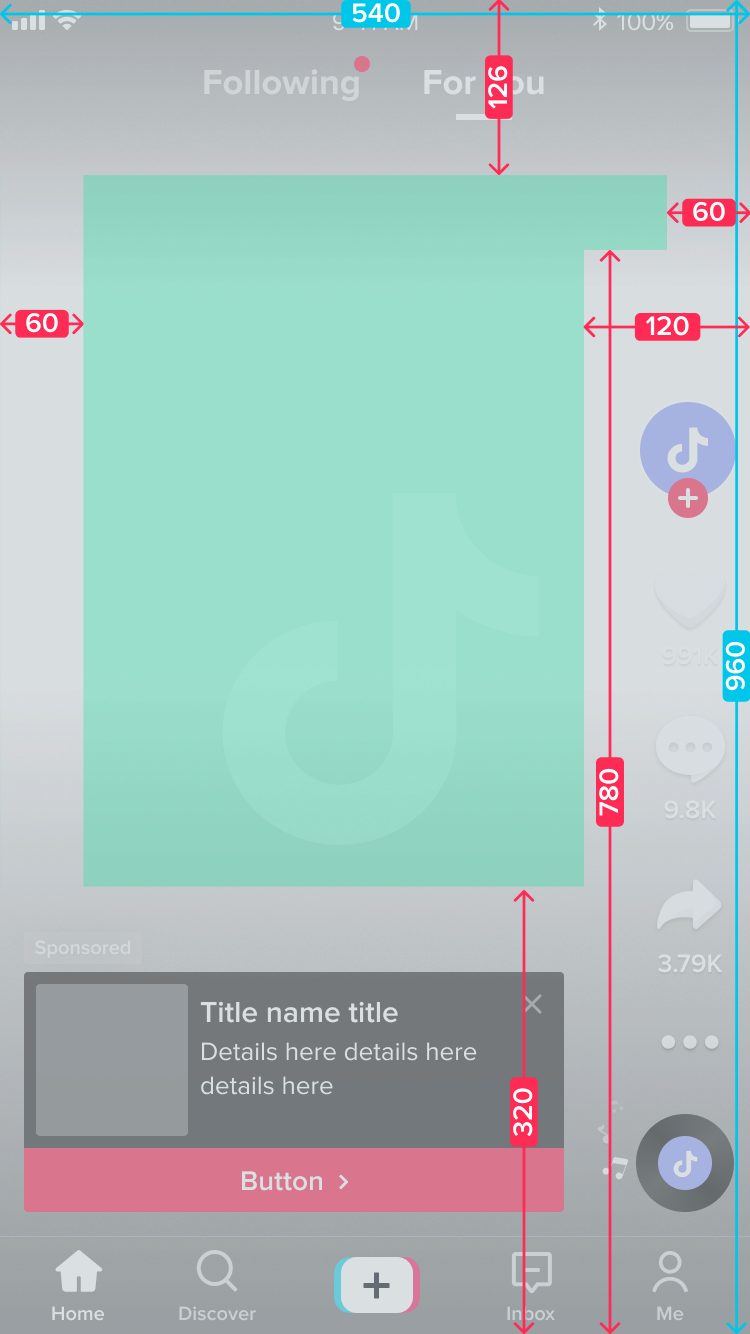
TikTok’s interface overlays (captions, buttons, profile info) can cover parts of your video. Keep logos, key text, and calls-to-action centred so nothing important gets hidden. If it’s too close to the edges, it’s at risk.
Be visually consistent
Your TikTok feed might move fast, but your brand still matters. Use consistent fonts, colours, and visual elements across videos and carousels so your content feels recognizable. Consistency builds familiarity. Familiarity builds trust.
Make carousels easy to follow
TikTok carousels (image posts) need clear progression. Each image should naturally lead into the next — whether you’re teaching something, telling a story, or highlighting a product. Users swipe quickly. If the flow is confusing, they’re gone.
Use text or stickers sparingly
Text overlays and stickers are powerful — but too many can clutter your frame. Use them to emphasize key moments, not overwhelm the viewer. Captions also improve accessibility and boost engagement, especially since many users watch without sound at first.
Optimize video quality
TikTok supports up to 1080p HD and even 4K uploads. But here’s the thing: larger files often get compressed.
For best results:
- Export in 1080p
- Use H.264 compression
- Keep your frame rate at or below 60fps
H.265 can reduce file size, but it isn’t supported on all devices — especially older Android models.
Always do a final human review
Even if your specs are perfect, review your captions, stickers, transitions, and framing on a phone before posting. Does it feel natural? Is the text readable? Does it look like something you’d stop scrolling for?
And remember, great formatting is just the start. To get your content seen by the right people, it’s worth understanding how TikTok surfaces videos in the feed. Check out our TikTok Algorithm Guide for insights on boosting reach, engagement, and discoverability.
TikTok post specs (2026)
TikTok supports vertical videos, square videos (mainly for cross-posting), and image carousels.
Video posts
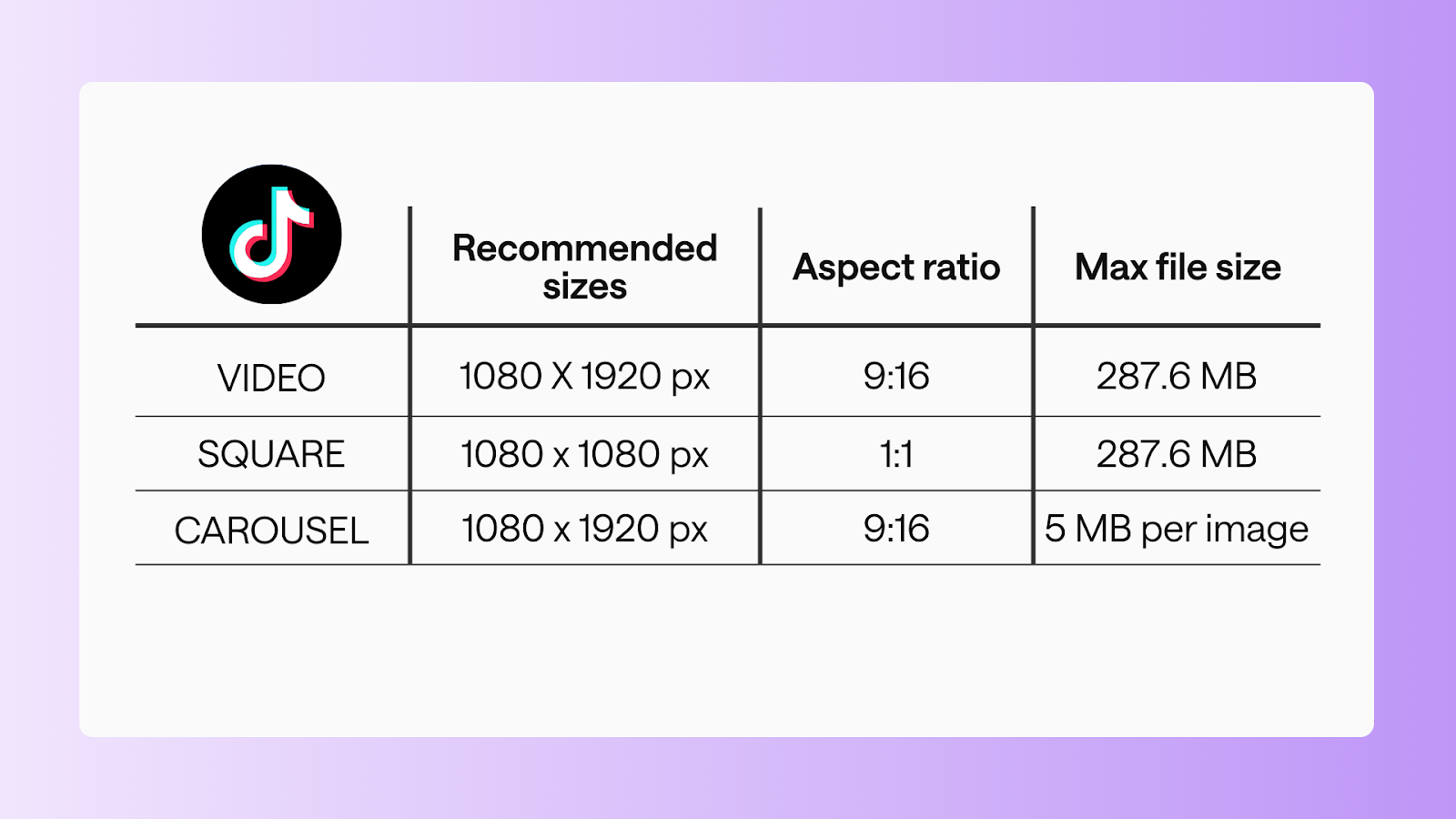
Standard video
- Recommended size: 1080 x 1920 px
- Aspect ratio: 9:16
- Max file size: 287.6 MB (iOS), 72 MB (Android)
- Duration: 3s-10 mins
Square video
- Recommended size: 1080 x 1080 px
- Aspect ratio: 1:1
- Max file size: 287.6 MB
- Duration: 3s-10 mins
Carousel posts
- Recommended size: 1080 x 1920
- Aspect ratio: 9:16
- Max file size: 5 MB per image
- Number of images: 2-10 images
Pro tip: Keep important visual elements like text, logos, or products in the center safe zone for carousels.
FAQs
Is TikTok ¾ or 9:16?
TikTok is primarily 9:16 vertical. While other ratios can technically upload, full-screen vertical performs best.
Why is TikTok 20 GB?
TikTok allows large uploads, but extremely high-resolution videos can hit platform limits or be heavily compressed after upload.
Should I post 4K or 1080p on TikTok?
1080p HD is ideal for most content. 4K can work, but large files are often compressed, which can reduce visible quality.
Why do my 4K videos look bad on TikTok?
TikTok compresses large files. High resolution combined with high bitrate can result in pixelation after upload.
How to share 4K videos without losing quality?
Export at 1080p using H.264 compression, optimize for mobile, and avoid excessive file sizes or frame rates above 60fps.
Is H.264 or H.265 better for TikTok?
H.264 is recommended for broad compatibility and smooth playback. H.265 reduces file size but may not perform consistently across all devices.
Create content that stops the scroll
TikTok success is all about vertical-first, mobile-ready, and visually intentional content. When you pair the right specs with strong storytelling and clean design, your videos don’t just show up; they grab attention.
Keep this guide bookmarked, share it with your team, and open it every time you’re exporting a new video to make sure your content always looks its best.
Still paying per seat for your social media tool? With HeyOrca, you get unlimited users – so your whole team (and clients!!) can collaborate without the extra cost. Plan, approve, and schedule your next post now.
Every member of your team deserves a seat at the table. That's why every HeyOrca plan comes with unlimited users. Choose the social media scheduler that helps you create, collaborate, and build community – without worrying about extra fees. Start your free trial.
Build stronger social media communities. HeyOrca brings your whole team together – with unlimited users!! – to plan, approve, and schedule content in one place. See it come together in minutes.
Looking for a social media tool built for teams and agencies? Plan, approve, and schedule your next post in minutes with HeyOrca – no credit card required.
.png)
Close all those tabs
Use HeyOrca to manage your social media content, approvals, and community in one place.
*no card required


.png)
.png)


%20Social%20News.png)