Social media post specs (2026): TikTok, Instagram, Facebook, LinkedIn & X/Twitter
Your ultimate guide to 2026 social media post sizes for LinkedIn, X/Twitter, Facebook, Instagram, and TikTok – images, videos, carousels, and more.
Keeping up with social media post specs can feel like a full-time job. Every platform has its own image sizes, video requirements, and file limits. And just when you think you’ve nailed them . . . they change.
So we did the heavy lifting for you.
This guide breaks down the latest 2026 post specs for Instagram, Facebook, TikTok, LinkedIn, and X/Twitter – all in one place. Use it to make sure your posts look great on desktop and mobile, load properly, and show up the way you intended.
Because when your content looks polished, your community notices.
This page gives you the specs. If you want deeper platform-specific tips and best practices, dive into these guides next:
- Instagram media specs & best practices (2026)
- Facebook posting specs & best practices in 2026
- TikTok media specs & best practices (2026)
- LinkedIn social media specs & best practices (2026)
- X (Twitter) media specs & best practices (2026)
What are social media specs?
Social media post specs are the recommended dimensions, file types, and limits for images, videos, and other media on each platform.
When you design within specs, your content shows up clearly, loads faster, and feels intentional instead of improvised.
Why post specs matter:
- Look professional: Avoid awkward crops, stretched images, or blurry videos
- Support engagement: Clean, well-formatted posts are easier to stop and interact with
- Stay consistent: Each platform displays content differently – specs help protect your brand's look
- Work with the algorithm: Platforms favour content that loads quickly and displays correctly
- Save time: Design it right the first time and skip last-minute resizing
Think of post specs like the rules of the road for social media. Follow them, and your content flows smoothly. Ignore them, and things can get a little bumpy.
Instagram post specs (2026 edition)
Instagram is built for scroll-stopping visuals. Whether you’re posting to the feed, Stories, or Reels, the right sizes help your content look polished and intentional – especially on mobile, where most of your community is scrolling.
Image posts
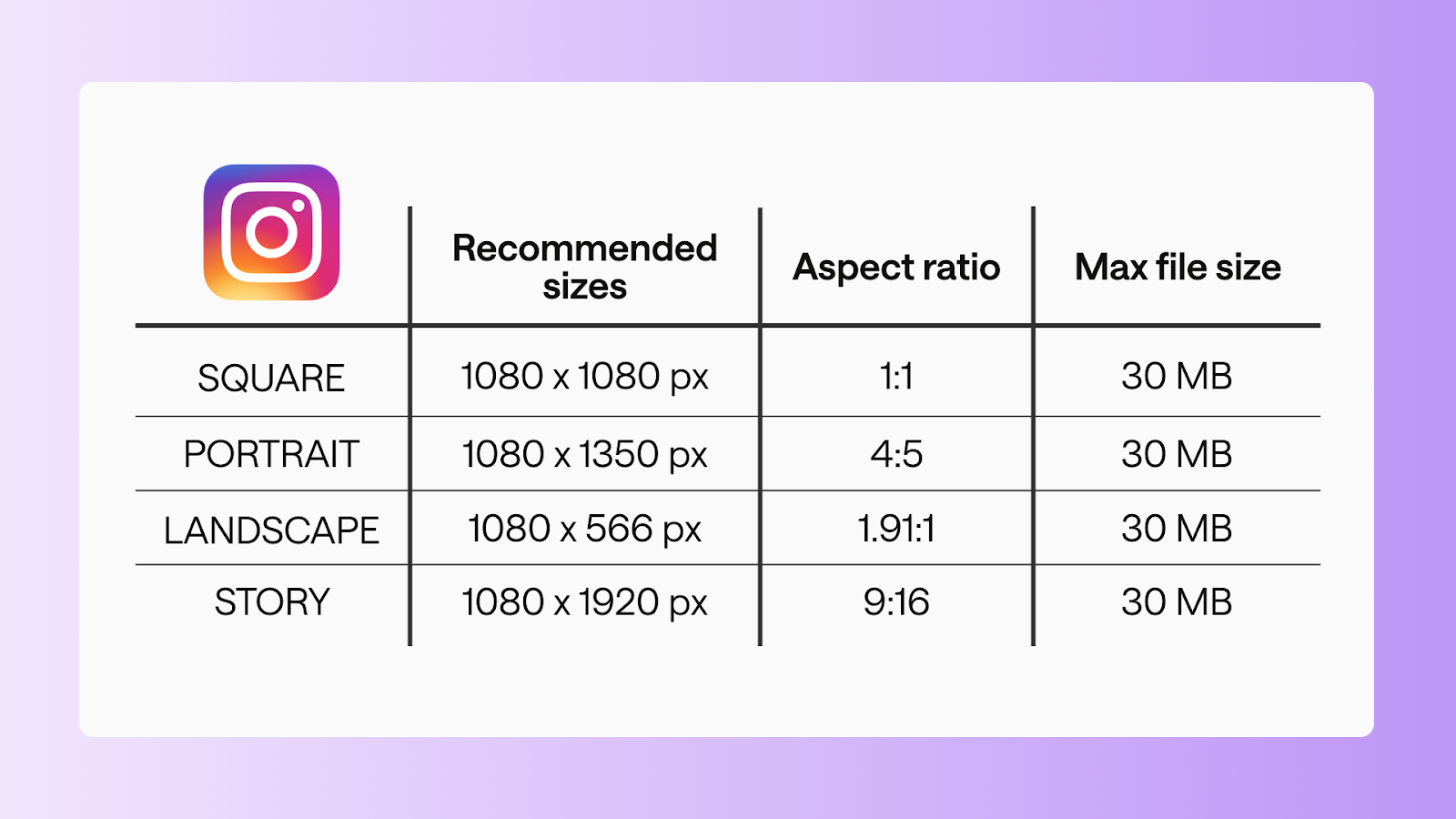
Square
- Recommended size: 1080 x 1080 px
- Aspect ratio: 1:1
- Max file size: 30 MB
Portrait
- Recommended size: 1080 x 1350 px
- Aspect ratio: 4:5
- Max file size: 30 MB
Landscape
- Recommended size: 1080 x 566 px
- Aspect ratio: 1.91:1
- Max file size: 30 MB
Story
- Recommended size: 1080 x 1920 px
- Aspect ratio: 9:16
- Max file size: 30 MB
Video posts
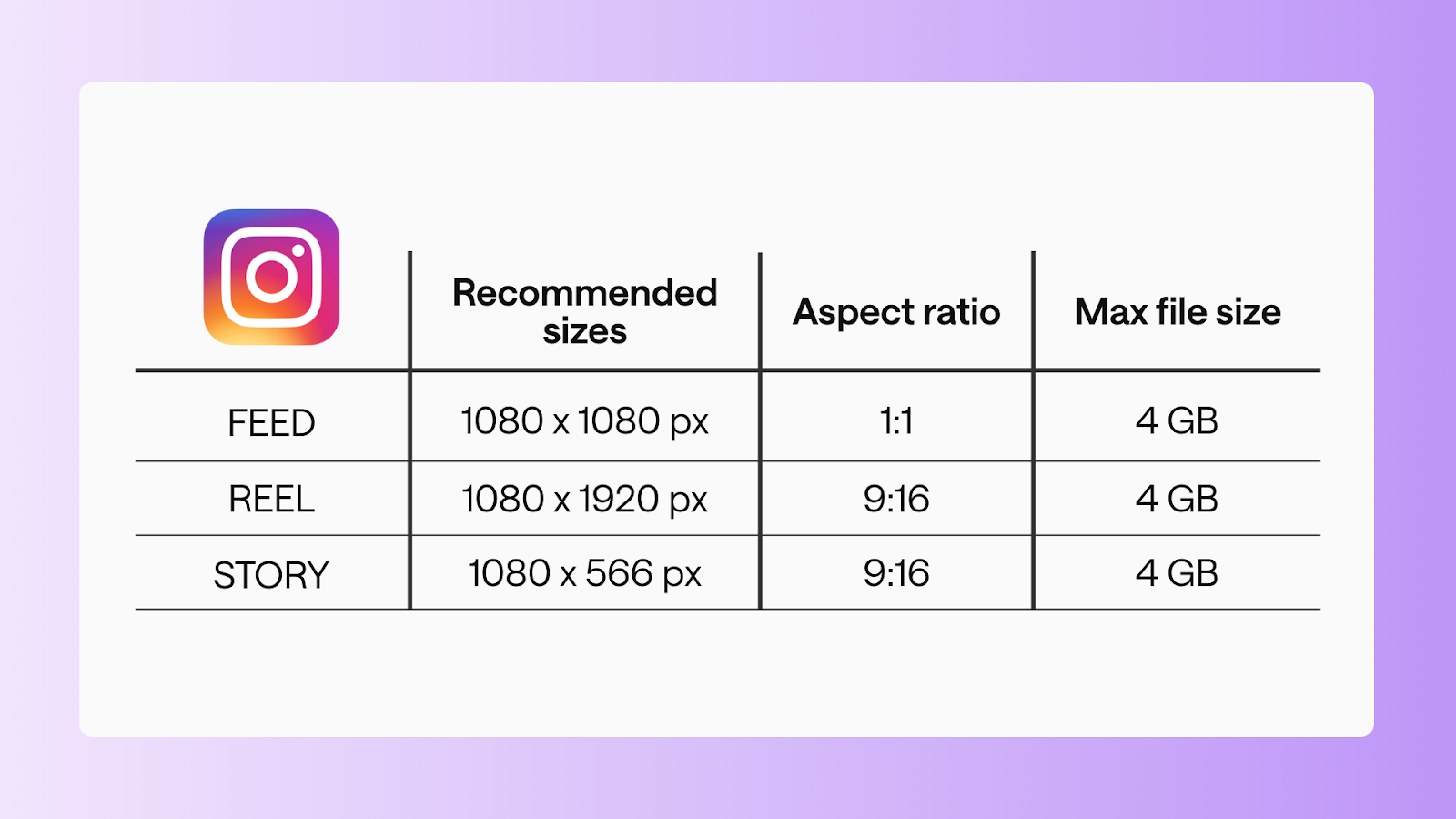
Feed video
- Recommended size: 1080 x 1080 px
- Aspect ratio: 1:1
- Max file size: 4 GB
- Duration: 3s-10 mins
Reel
- Recommended size: 1080 x 1920 px
- Aspect ratio: 9:16
- Max file size: 4 GB
- Duration: 3s-10 mins
Story
- Recommended size: 1080 x 1920
- Aspect ratio: 9:16
- Max file size: 4 GB
- Duration: 3s-60s
Facebook page post specs (2026 edition)
Facebook supports a wide mix of formats, which makes specs especially important. Using the right sizes helps your posts display cleanly across desktop and mobile – without unexpected crops.
Image posts
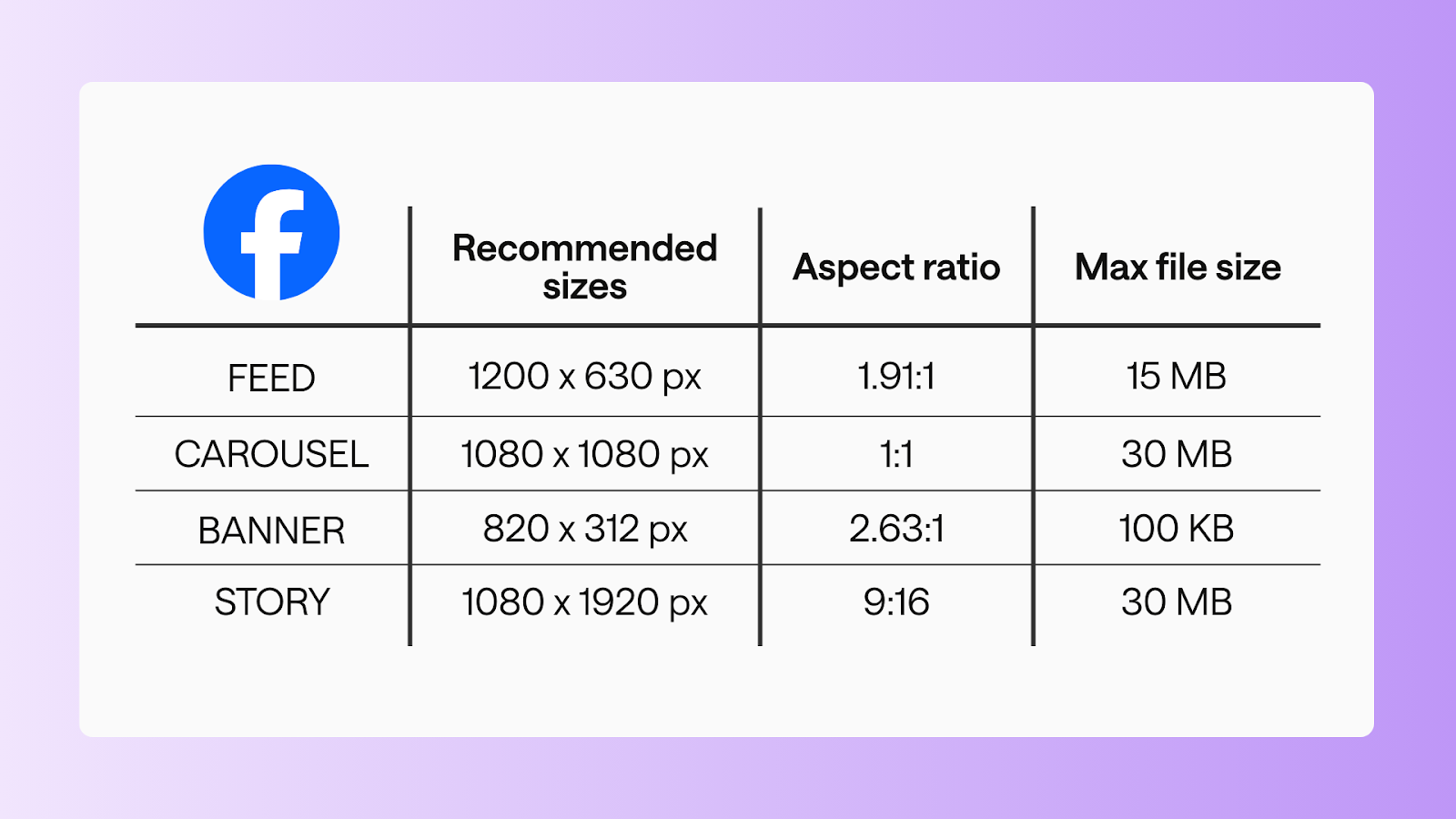
Feed image
- Recommended size: 1200 x 630 px
- Aspect ratio: 1.91:1
- Max file size: 15 MB
Carousel image
- Recommended size: 1080 x 1080 px
- Aspect ratio: 1:1
- Max file size: 30 MB
Cover/banner
- Recommended size: 820 x 312 px
- Aspect ratio: 2.63:1
- Max file size: 100 KB
Video posts
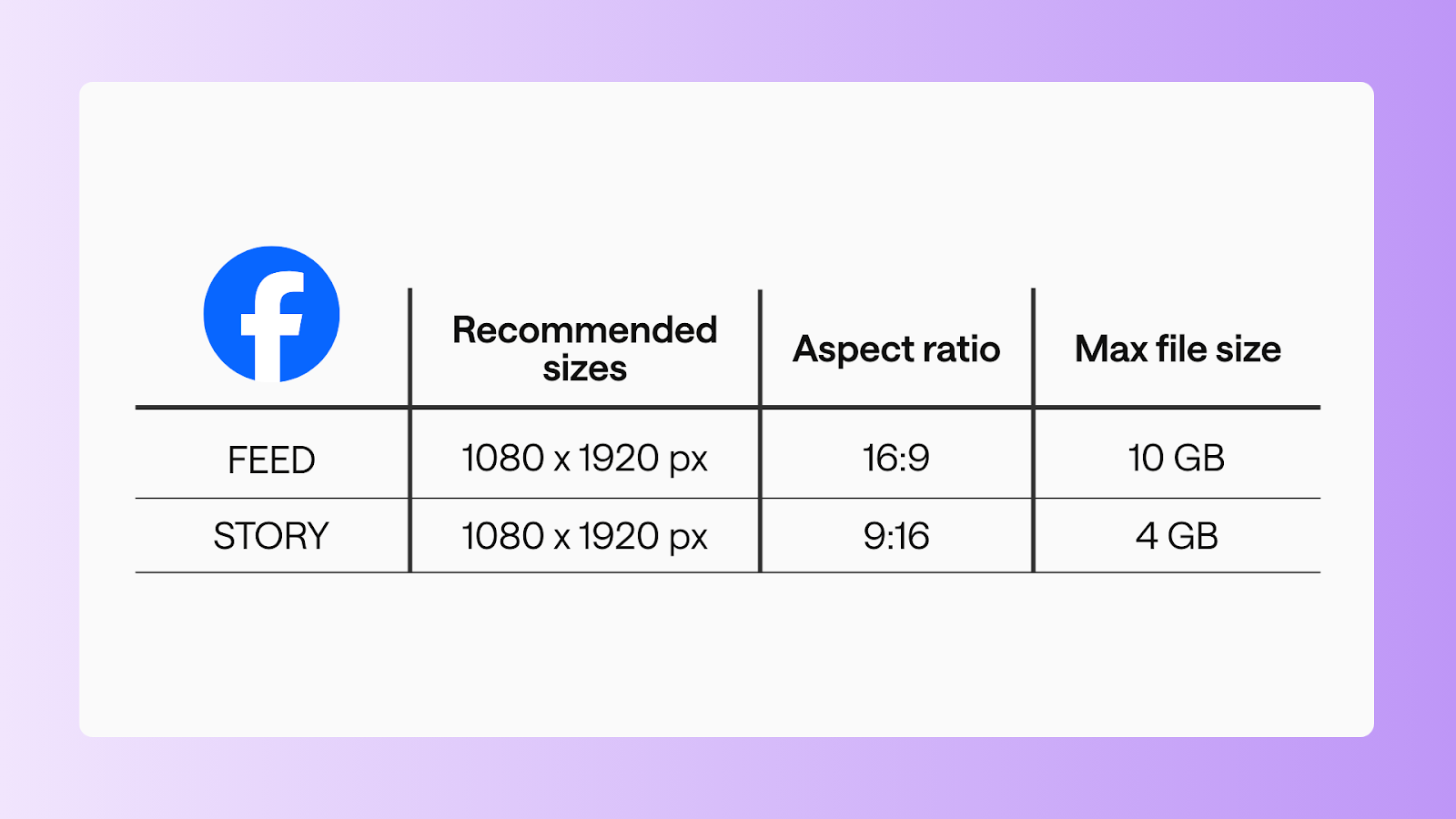
Standard video
- Recommended size: 1080 x 1920 px
- Aspect ratio: 16:9
- Max file size: 10 GB
- Duration: 1s - 240 mins
Story video
- Recommended size: 1080 x 1920 px
- Aspect ratio: 9:16
- Max file size: 4 GB
- Duration: 0:01- 20s
TikTok post specs (2026 edition)
TikTok is all about vertical, mobile-first content. These specs help your videos and carousels feel native to the feed – not like reposts that don’t quite fit.
Video posts
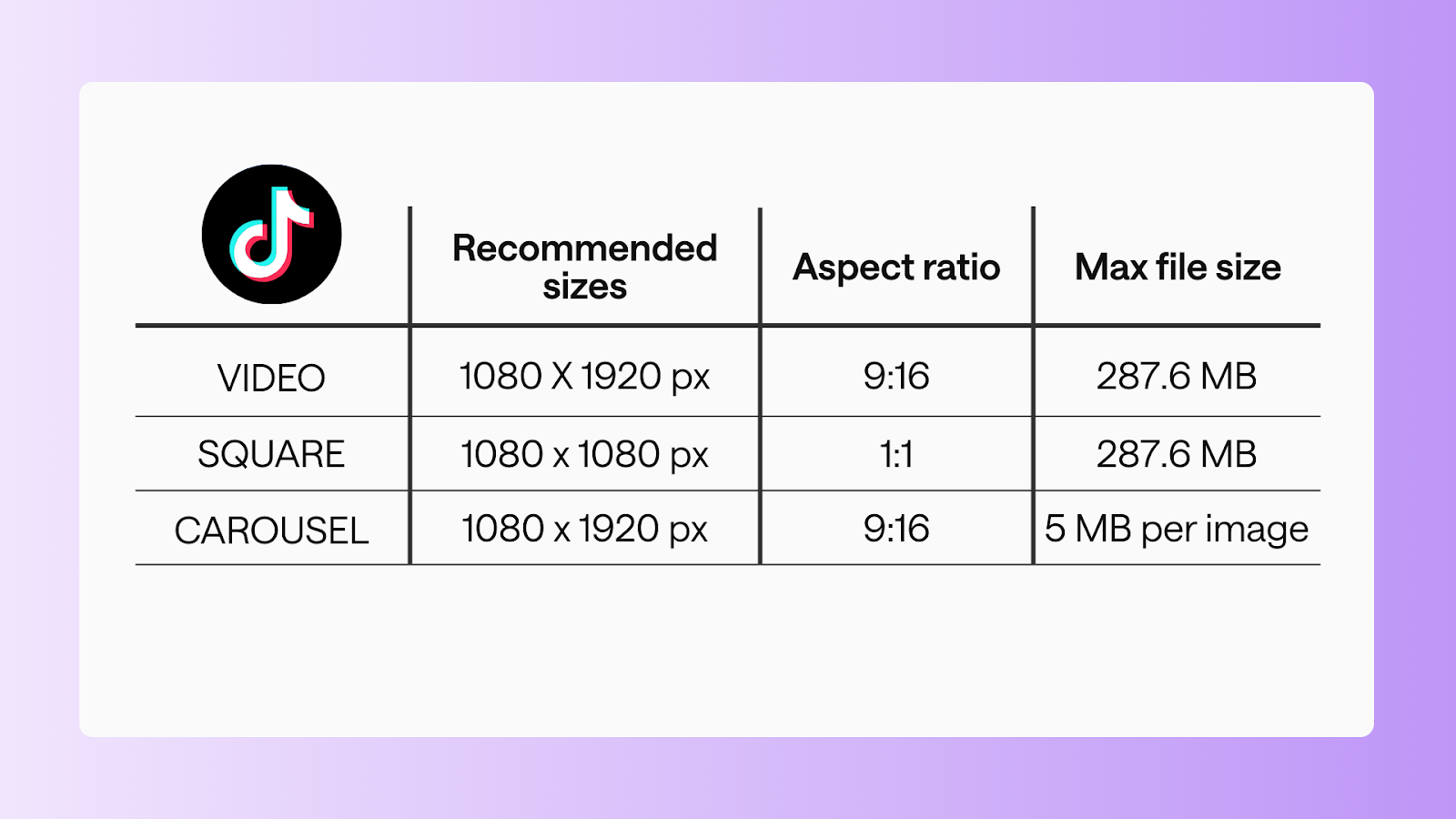
Standard video
- Recommended size: 1080 x 1920 px
- Aspect ratio: 9:16
- Max file size: 287.6 MB (iOS), 72 MB (Android)
- Duration: 3s-10 mins
Square video
- Recommended size: 1080 x 1080 px
- Aspect ratio: 1:1
- Max file size: 287.6 MB
- Duration: 3s-10 mins
Carousel posts
- Recommended size: 1080 x 1920
- Aspect ratio: 9:16
- Max file size: 5 MB per image
- Number of images: 2-10 images
LinkedIn company page post specs (2026)
LinkedIn is where professional content lives. Clean formatting goes a long way in helping your posts feel credible, clear, and easy to engage with.
Image posts
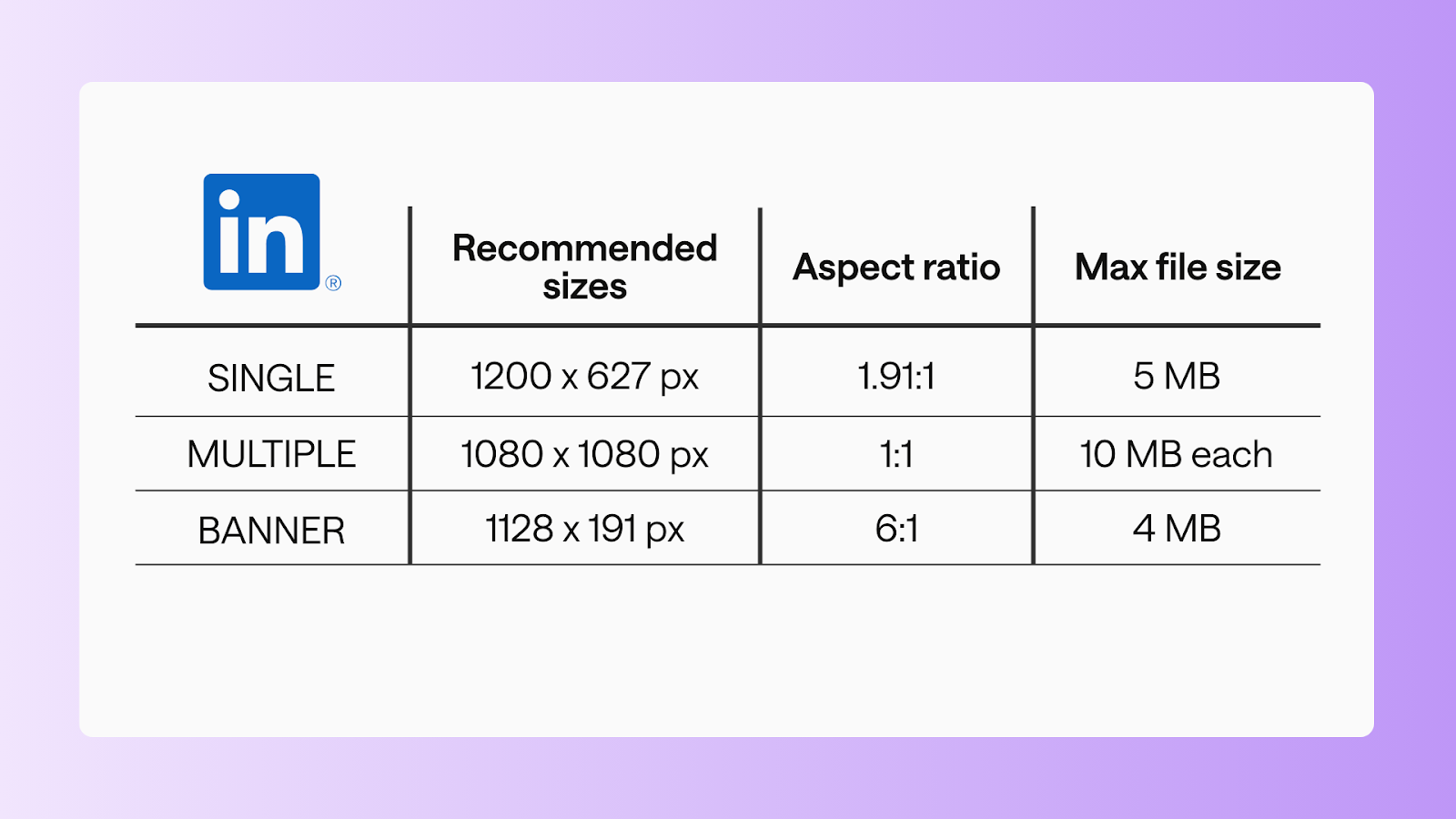
Single image
- Recommended size: 1200 x 627 px
- Aspect ratio: 1.91:1
- Max file size: 5 MB
Multiple images
- Recommended size: 1080 x 1080
- Aspect ratio: 1:1
- Max file size: 10 MB each
Banner image
- Recommended size: 1128 x 191 px
- Aspect ratio: 6:1
- Max file size: 4 MB
Video posts
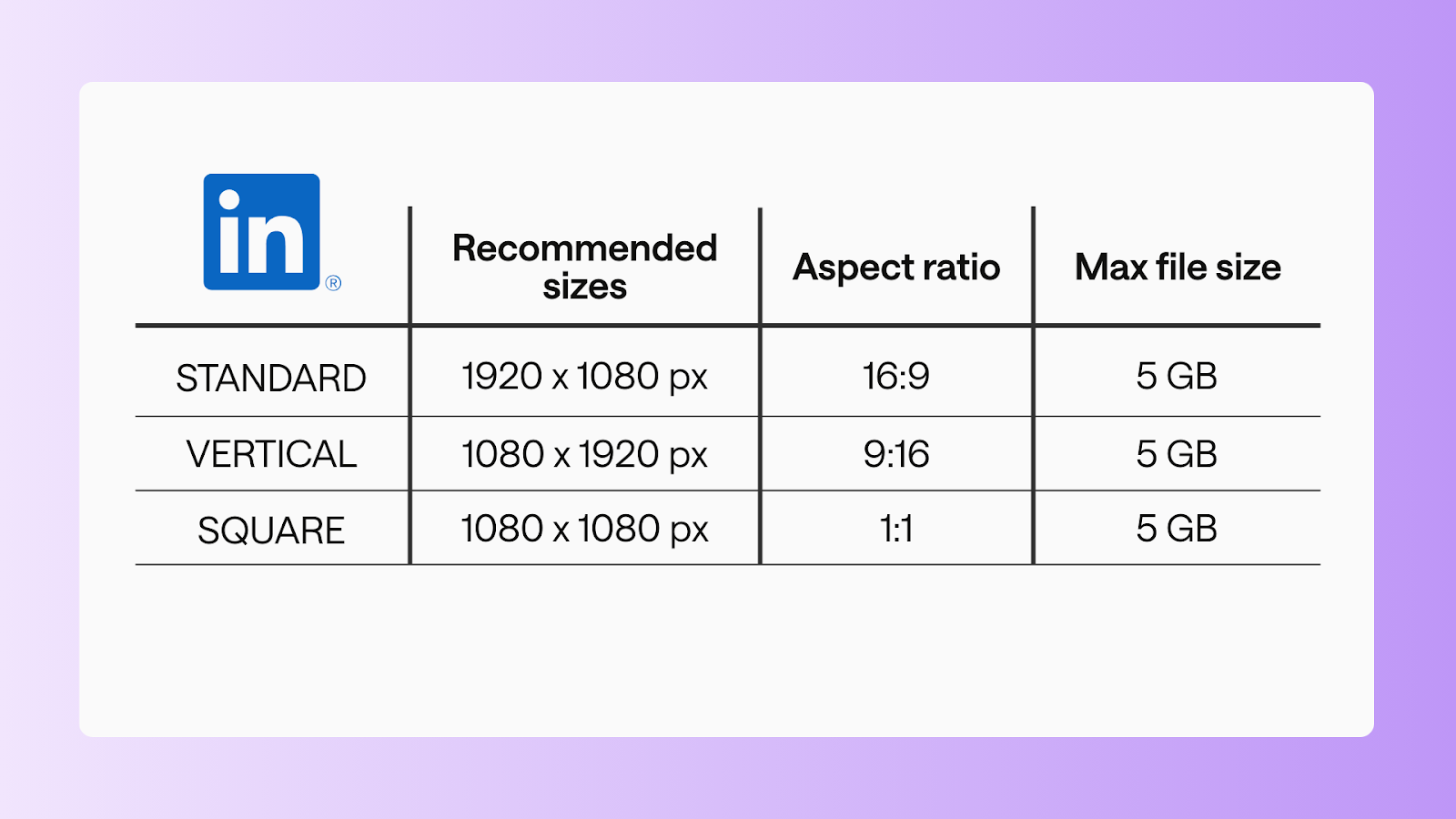
Standard video
- Recommended size: 1920 x 1080 px
- Aspect ratio: 16:9
- Max file size: 5 GB
- Duration: 3s-10 minutes
Vertical video
- Recommended size: 1080 x 1920 px
- Aspect ratio: 9:16
- Max file size: 5 GB
- Duration: 3s-10 minutes
Square video
- Recommended size: 1080 x 1080 px
- Aspect ratio: 1:1
- Max file size: 5 GB
- Duration: 3s-10 minutes
Document & carousel posts
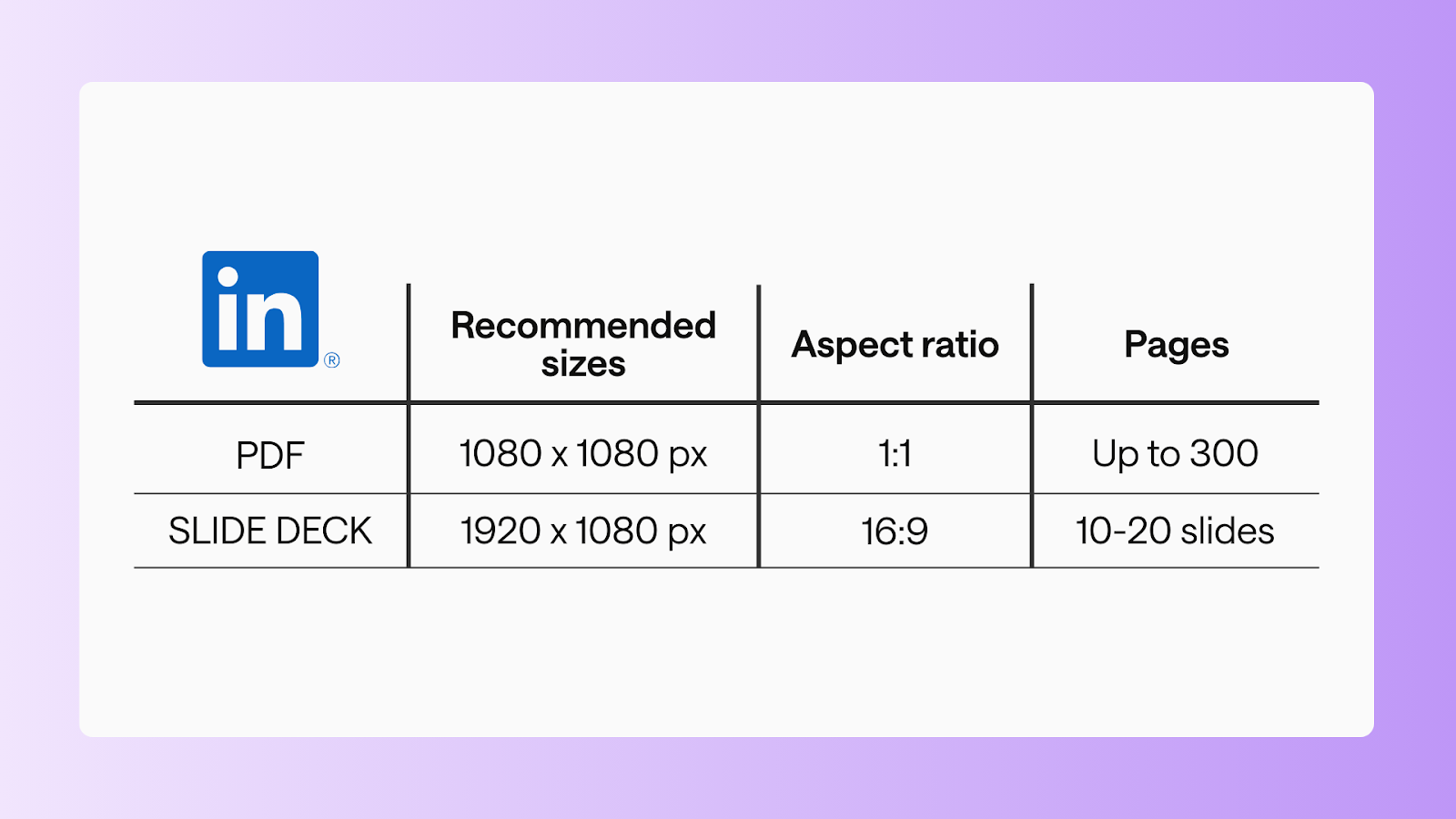
PDF document
- Recommended size: 1080 x 1080 px
- Aspect ratio: 1:1
- Max file size: 100 MB
- Pages: up to 300 pages
Slide deck carousel
- Recommended size: 1920 x 1080 px
- Aspect ratio: 16:9
- Max file size:100 MB
- Pages: 10-20 slides
X/Twitter post specs (2026 edition)
Although a text-based platform, using the right sizes helps your images and videos stand out in a crowded timeline on X/Twitter.
Image posts
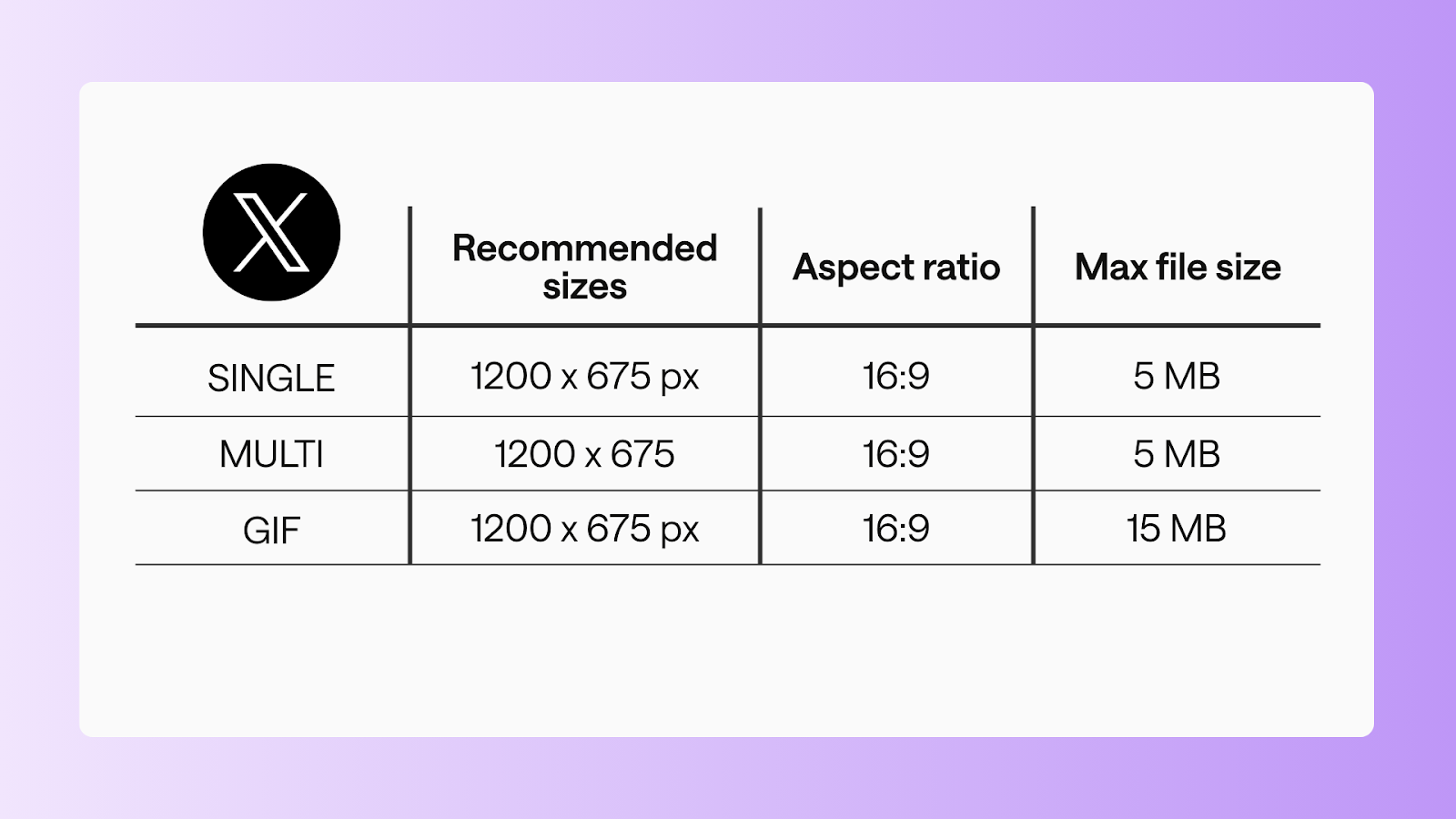
Single image
- Recommended size: 1200 x 675 px
- Aspect ratio: 16:9
- Max file size: 5 MB
Multi-image
- Recommended size: 1200 x 675 px
- Aspect ratio: 16:9
- Max file size: 5 MB each
GIF
- Recommended size: 1200 x 675 px
- Aspect ratio: 16:9
- Max file size: 15 MB
Video posts
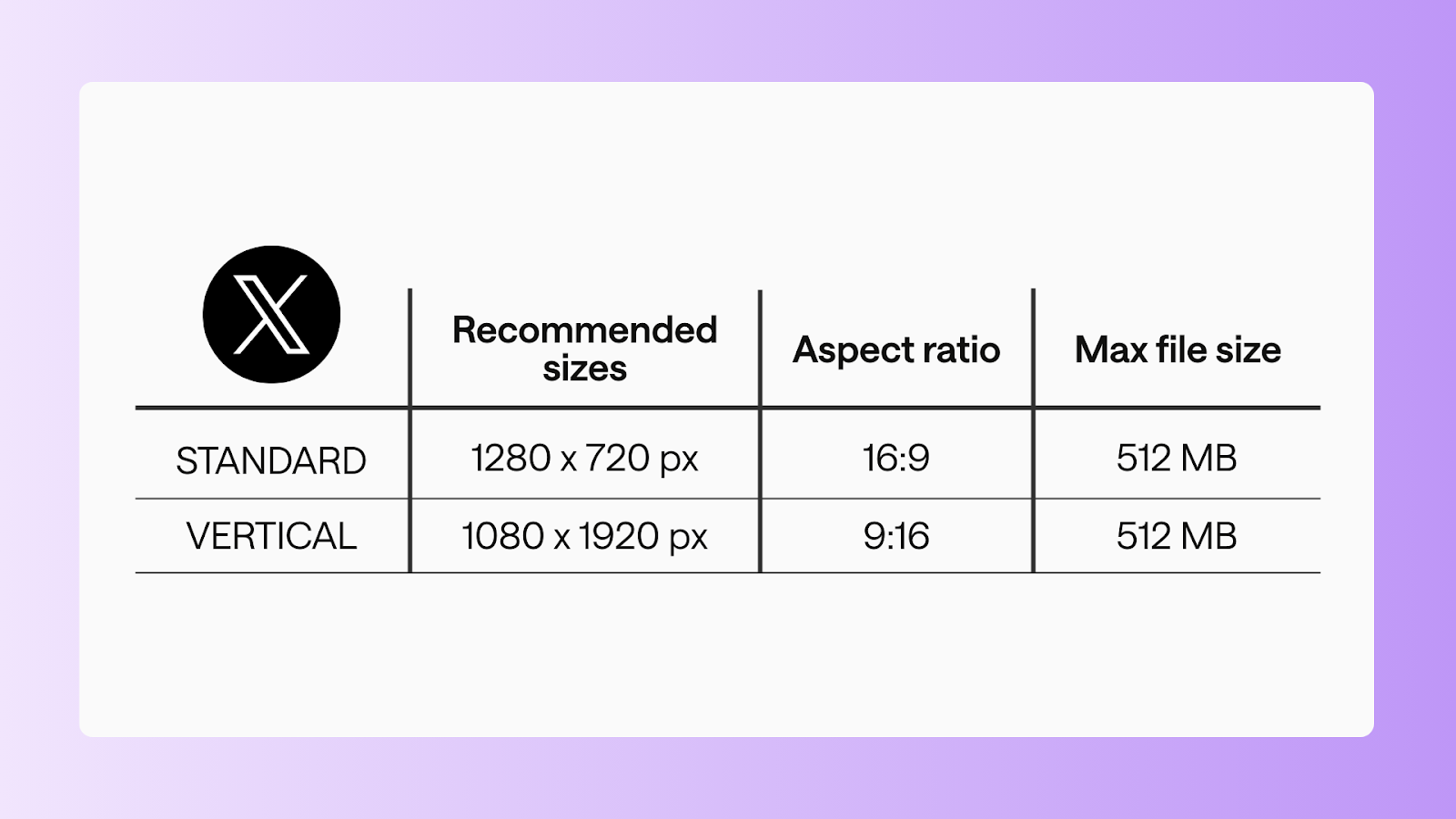
Standard video
- Recommended size: 1280 x 720 px
- Aspect ratio: 16:9
- Max file size:512 MB
- Duration: 0:01-2:20
Vertical video
- Recommended size: 1080 x 1920 px
- Aspect ratio: 9:16
- Max file size: 512 MB
- Duration: 0:01-2:20
FAQs
What are the media specs for Instagram?
Instagram supports several formats – square, portrait, and landscape images, carousels, Stories, and Reels. Each one has its own recommended dimensions and file limits. Following those specs helps your content look sharp, fill the screen properly, and feel native in the feed.
Do social media specs change often?
Yes. Platforms tweak layouts, feeds, and formats more often than we’d all like. Core dimensions usually stay fairly stable, but it’s a good idea to double-check specs regularly so your content doesn’t fall out of step with platform updates.
What happens if I use the wrong image or video size?
Your post might get cropped, look pixelated, or display oddly – especially on mobile. In some cases, key text or visuals can be cut off entirely, which can hurt engagement and make your brand feel less polished.
Are social media post specs the same for all platforms?
Nope. Every platform plays by its own rules. TikTok is built for vertical video, LinkedIn leans into documents and landscape visuals, and Instagram offers a mix of feed and Story formats – all with different specs.
What image format is best for social media posts?
JPEG and PNG are your safest bets across platforms. JPEGs work well for photos, while PNGs are better for graphics, text, and logos that need crisp edges.
Are social media specs different for mobile and desktop?
Yes. Most platforms are mobile-first, which means specs are designed with smaller screens in mind. Using the recommended sizes helps your content display cleanly on both mobile and desktop – without surprise crops.
Best practices across all platforms
No matter where you’re posting, these best practices help your content feel intentional and perform better:
- Design mobile-first: Most of your community will see your posts on their phones
- Add captions to every video: Autoplay is muted, and captions support accessibility
- Keep branding consistent: Fonts, colours, and visual style should feel cohesive across formats
- Use carousels with purpose: Each slide should move the story forward
- Test and learn: Track performance and adjust based on what actually works
- Do a final human review: A last pass keeps your tone, authenticity, and brand voice intact
Using the right post sizes in 2026 helps your content look professional, feel polished, and show up the way you intended across platforms.
Save this guide. Bookmark it. Share it with your team.
It’s your go-to reference for social media post specs – whenever you need it.
Still paying per seat for your social media tool? With HeyOrca, you get unlimited users – so your whole team (and clients!!) can collaborate without the extra cost. Plan, approve, and schedule your next post now.
Every member of your team deserves a seat at the table. That's why every HeyOrca plan comes with unlimited users. Choose the social media scheduler that helps you create, collaborate, and build community – without worrying about extra fees. Start your free trial.
Build stronger social media communities. HeyOrca brings your whole team together – with unlimited users!! – to plan, approve, and schedule content in one place. See it come together in minutes.
Looking for a social media tool built for teams and agencies? Plan, approve, and schedule your next post in minutes with HeyOrca – no credit card required.
.png)
Close all those tabs
Use HeyOrca to manage your social media content, approvals, and community in one place.
*no card required


.png)
.png)


%20Social%20News.png)