Optimal Facebook posting specs & best practices in 2026
Want your Facebook posts to look polished and perform better? Check out the 2026 specs for images, videos, Stories, and carousels, plus tips on sizes, aspect ratios, and resolution.
Ever post something on Facebook that looked great in the preview and then weirdly cropped in the feed? Yeah. It happens.
Facebook is still a major platform for brands, businesses, and community building. But because it supports so many formats — feed posts, Stories, videos, carousels, cover photos — using the right specs really matters.
If you want deeper platform-specific tips, check out these guides next:
- Social media post specs (2026)
- LinkedIn social media specs & best practices (2026)
- TikTok media specs & best practices (2026)
- Instagram media specs & best practices (2026)
- X (Twitter) media specs & best practices (2026)
Facebook best practices in 2026
Let’s make sure your content looks just as good in the feed as it did when you designed it.
Think mobile first (always)
Most people scroll Facebook on their phones. That means vertical and properly sized content usually performs better. Keep important elements — text, logos, CTAs — centred so they don’t get awkwardly cropped on smaller screens.
If it looks good on mobile, you’re in a strong place.
Use the right aspect ratio for the job
Different formats call for different shapes:
- Feed images work well in 1.91:1 (landscape) or 4:5 (portrait)
- Carousels perform best in 1:1 (square)
- Stories and vertical videos should be 9:16 for full-screen impact
When in doubt? Go portrait (4:5) for feed posts — it takes up more space and grabs more attention on mobile.
Don’t skip resolution
Blurry posts are an immediate credibility killer. Use high-resolution images (1080 px wide or larger when possible) to avoid pixelation.
For video, stick with MP4 or MOV using H.264 compression. It keeps playback smooth without sacrificing quality.
Keep your branding consistent
Your feed posts, Stories, and carousels shouldn’t feel like they belong to different brands. Use consistent colours, fonts, and visual styles so your audience instantly recognizes your content.
Tools like Canva Pro make resizing and template-building super easy — especially when you’re creating content across multiple formats.
Use carousels strategically
Carousels are perfect for storytelling, product features, tutorials, and step-by-step breakdowns. Just make sure every slide uses the same size and aspect ratio so swiping feels smooth and intentional.
Track what actually performs
Pay attention to what gets clicks, saves, comments, and shares. Test different formats and posting times. Then double down on what your audience clearly loves.
Always do a human review
Even if you’re using AI or templates, give everything a final human once-over. Check your captions. Check your visuals. Make sure your tone feels on-brand.
Specs matter — but the human touch is what makes content connect.
Facebook post specs (2026)
Facebook supports a wide mix of formats, which makes sizing especially important. Using the right dimensions helps your posts display cleanly across desktop and mobile — without surprise cropping.
Image posts
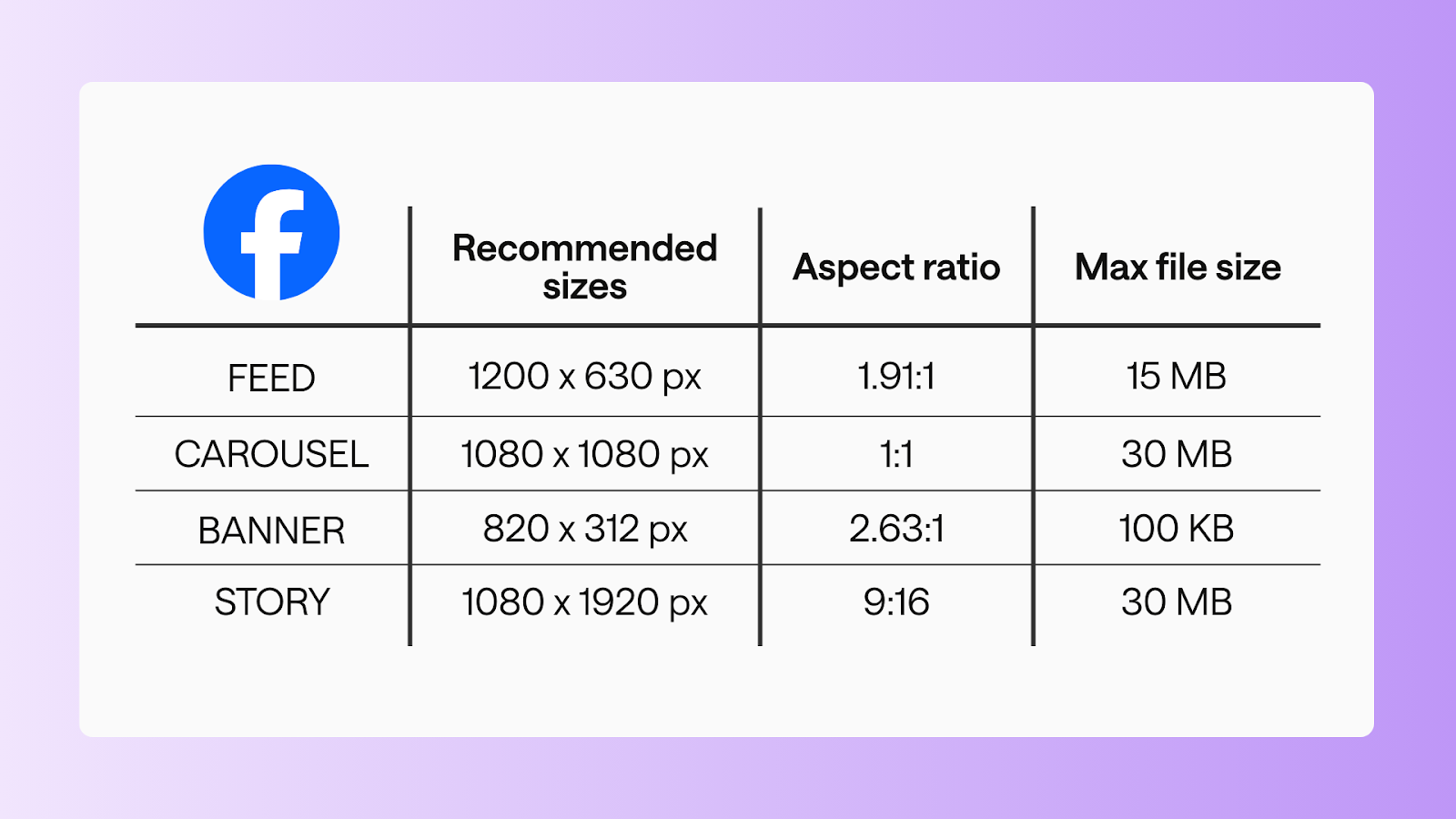
Feed image
- Recommended size: 1200 x 630 px
- Aspect ratio: 1.91:1
- Max file size: 15 MB
Carousel image
- Recommended size: 1080 x 1080 px
- Aspect ratio: 1:1
- Max file size: 30 MB
Cover/banner
- Recommended size: 820 x 312 px
- Aspect ratio: 2.63:1
- Max file size: 100 KB
Video posts
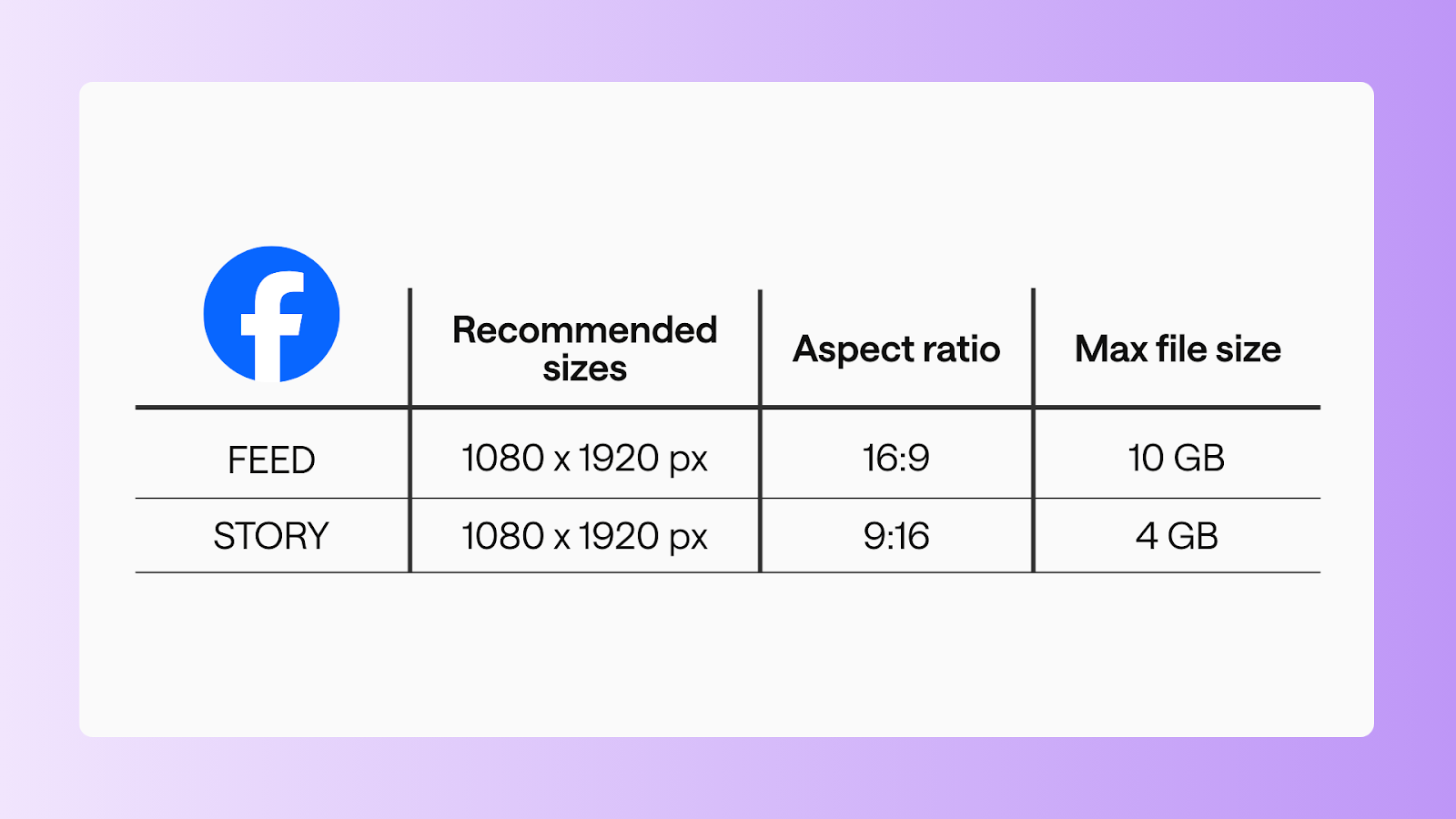
Standard video
- Recommended size: 1080 x 1920 px
- Aspect ratio: 16:9
- Max file size: 10 GB
- Duration: 1s - 240 mins
Story video
- Recommended size: 1080 x 1920 px
- Aspect ratio: 9:16
- Max file size: 4 GB
- Duration: 0:01- 20s
Pro tip: Keep key content centred, especially for Stories and vertical videos.
FAQs
What is the standard FB post size?
- Feed images: 1200 x 630 px (1.91:1)
- Portrait posts: 1080 x 1350 px (4:5)
- Carousels: 1080 x 1080 px
Are Facebook posts 4x5?
They can be! A 4:5 vertical post (1080 x 1350 px) works great for mobile because it takes up more feed space.
Is 1920x1080 good for Facebook posts?
Yes! 1920x1080 px works well for landscape videos and some feed visuals.
What resolution is best for FB posts?
- High-resolution images (1080 px wide or more) help prevent blurring.
- Videos should be MP4 or MOV with H.264 compression.
What aspect ratio for Facebook?
- Feed: 1.91:1 (landscape) or 4:5 (portrait)
- Stories: 9:16 vertical
- Carousel: 1:1 square
What are common FB image size mistakes?
Using low-resolution images, mixing aspect ratios in carousels, or placing text too close to the edges (which risks cropping).
How to resize a photo to fit a Facebook post?
Use tools like Canva Pro, Photoshop, or an online image resizer. Just make sure your final export matches the recommended aspect ratio for feed, carousel, or Stories.
Make your Facebook content stand out
Facebook content performs best when you combine strategy, strong visuals, and the correct specs. Whether you’re posting feed images, videos, Stories, or carousels, using the right dimensions ensures your content looks polished and intentional on every device.
Bookmark this guide. Share it with your team. Keep it open while you design.
Want to stay on top of the latest Facebook updates and trends while using these specs? Check out our Facebook Social News Update for the newest features, algorithm insights, and engagement tips.
Still paying per seat for your social media tool? With HeyOrca, you get unlimited users – so your whole team (and clients!!) can collaborate without the extra cost. Plan, approve, and schedule your next post now.
Every member of your team deserves a seat at the table. That's why every HeyOrca plan comes with unlimited users. Choose the social media scheduler that helps you create, collaborate, and build community – without worrying about extra fees. Start your free trial.
Build stronger social media communities. HeyOrca brings your whole team together – with unlimited users!! – to plan, approve, and schedule content in one place. See it come together in minutes.
Looking for a social media tool built for teams and agencies? Plan, approve, and schedule your next post in minutes with HeyOrca – no credit card required.
.png)
Close all those tabs
Use HeyOrca to manage your social media content, approvals, and community in one place.
*no card required


%20(2).png)