LinkedIn social media specs & best practices (2026)
Want your LinkedIn posts to look professional and get noticed? Check out the 2026 specs for images, videos, carousels, and documents (plus easy best practices to make your content shine).
Over the years, LinkedIn has evolved: what started as primarily landscape images has expanded to square posts, carousels, and now vertical videos.
That means your visuals need to adapt, too. Using the right LinkedIn specs ensures your content looks professional, your text is readable, and your message lands exactly as you intended — whether someone is scrolling on desktop or mobile.
If you want deeper platform-specific tips, check out these guides next:
- Social media post specs (2026)
- Facebook posting specs & best practices in 2026
- TikTok media specs & best practices (2026)
- Instagram media specs & best practices (2026)
- X (Twitter) media specs & best practices (2026)
Why LinkedIn post specs matter
LinkedIn prioritizes clean visuals, clear text hierarchy, professional presentation, and readability on both desktop and mobile.
Using the correct image size or video format ensures that your content isn’t awkwardly cropped, text stays legible, thumbnails display correctly, documents swipe smoothly, and your brand feels polished and intentional.
LinkedIn best practices in 2026
No gatekeeping here! Follow these tips to make your LinkedIn posts shine.
Think about desktop and mobile
LinkedIn is still big on desktop, but mobile users are growing fast. Make sure your images, videos, and documents look great on both. Keep key elements, like text overlays and logos, centred so nothing gets chopped off.
Pick the right format for your content
Single-image posts are perfect when you want clean, professional visuals.
Multiple images? Carousels are your friend (up to 9 images — just remember to save them as a PDF, or your followers won’t be able to swipe).
PDFs and slide decks work really well for thought leadership, tutorials, or anything that’s a little more detailed. Videos? Square, vertical, or landscape; whatever fits your feed goal.
Add captions to your videos
LinkedIn videos autoplay muted by default, which means many viewers watch without sound.
Adding captions not only makes your content accessible to everyone, including those watching in quiet environments, but it also boosts engagement by helping your message land even when audio isn’t on.
Keep your branding consistent
Using the same colours, fonts, and visual identity across posts makes your brand instantly recognizable.
Canva Pro is a lifesaver here! It lets you design, resize, and keep everything looking cohesive, all with a few clicks.
Use carousel posts strategically
Multi-slide PDFs or documents are amazing for storytelling, reports, or tutorials. Just make sure every slide is consistent in size and style so swiping feels smooth and intentional.
Track what works
Check engagement by post type, format, and timing. What gets saved, clicked, or shared? Pay attention, learn, and double down on the formats your audience loves.
Always do a final human review
If you’re using AI to help with specs, captions, or visuals, make sure a real person reviews everything. A human touch keeps your posts professional, authentic, and true to your brand voice.
Do all this, and your LinkedIn posts won’t just look good — they’ll feel polished, professional, and intentional. Your audience will notice, and engagement will follow.
LinkedIn post specs (2026)
LinkedIn supports multiple content formats. Here’s how to ensure your posts display perfectly across desktop and mobile:
Image posts
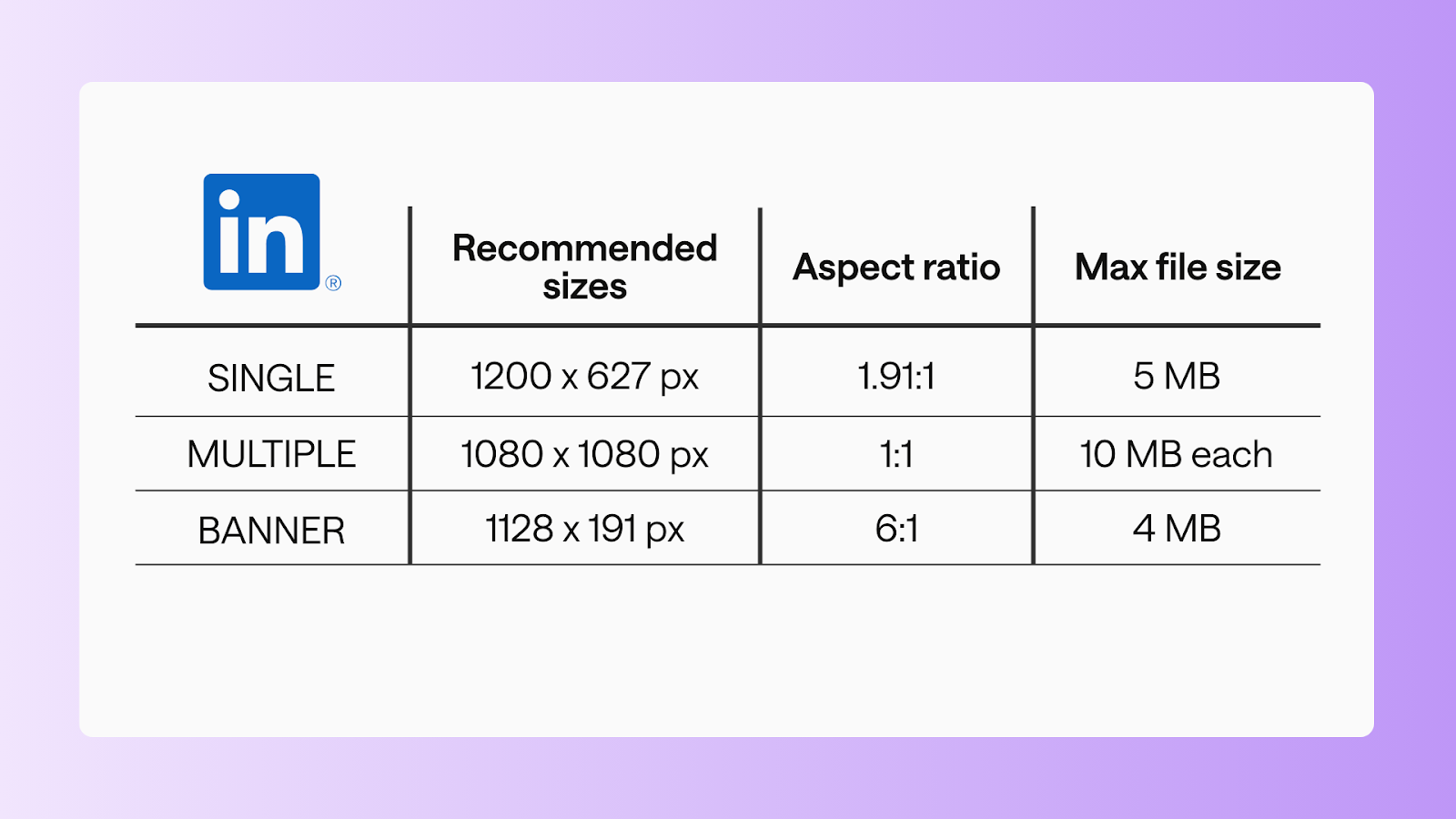
Single image
- Recommended size: 1200 x 627 px
- Aspect ratio: 1.91:1
- Max file size: 5 MB
Multiple images
- Recommended size: 1080 x 1080
- Aspect ratio: 1:1
- Max file size: 10 MB each
Banner image
- Recommended size: 1128 x 191 px
- Aspect ratio: 6:1
- Max file size: 4 MB
Video posts
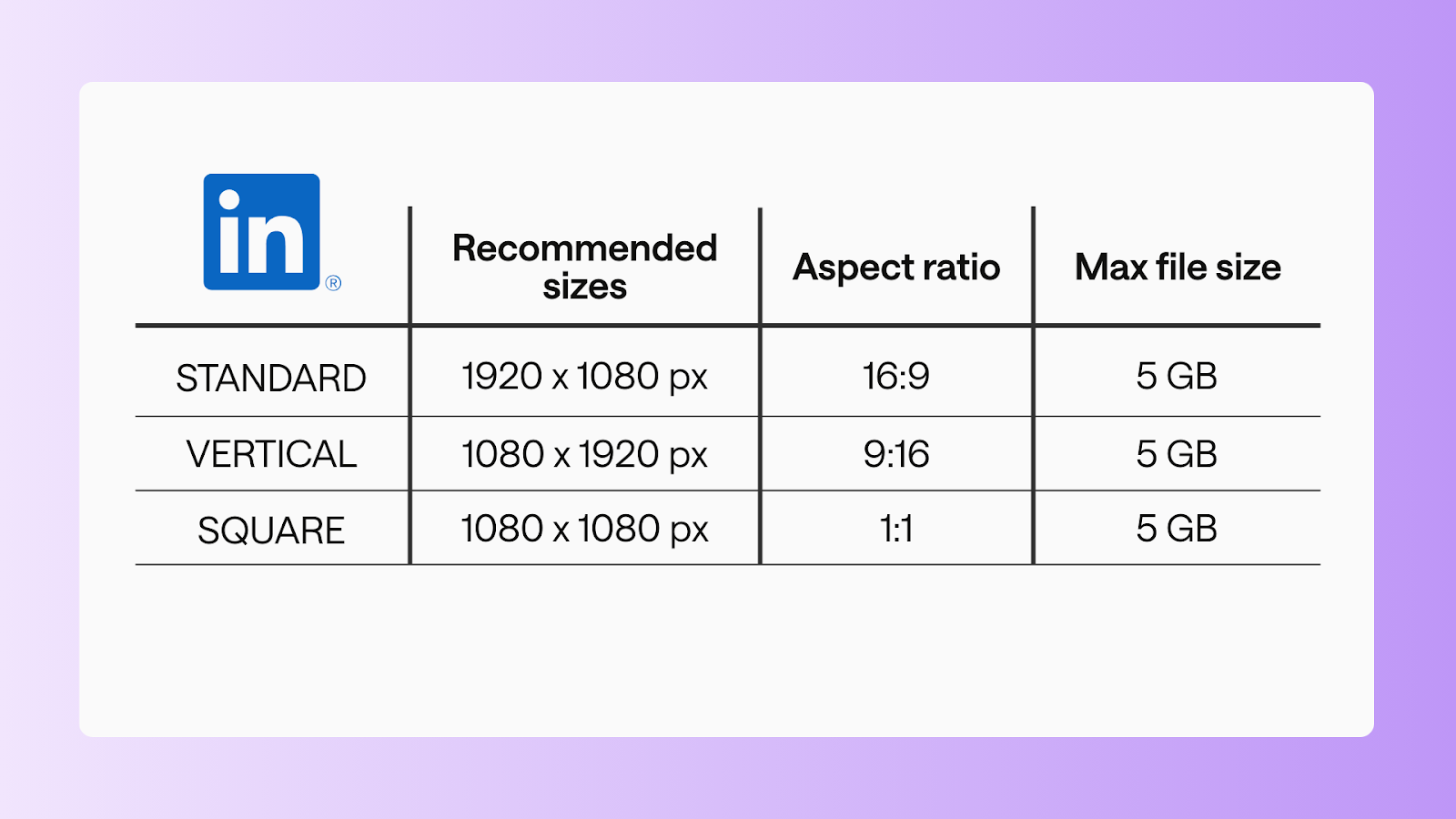
Standard video
- Recommended size: 1920 x 1080 px
- Aspect ratio: 16:9
- Max file size: 5 GB
- Duration: 3s-10 minutes
Vertical video
- Recommended size: 1080 x 1920 px
- Aspect ratio: 9:16
- Max file size: 5 GB
- Duration: 3s-10 minutes
Square video
- Recommended size: 1080 x 1080 px
- Aspect ratio: 1:1
- Max file size: 5 GB
- Duration: 3s-10 minutes
Document & carousel posts
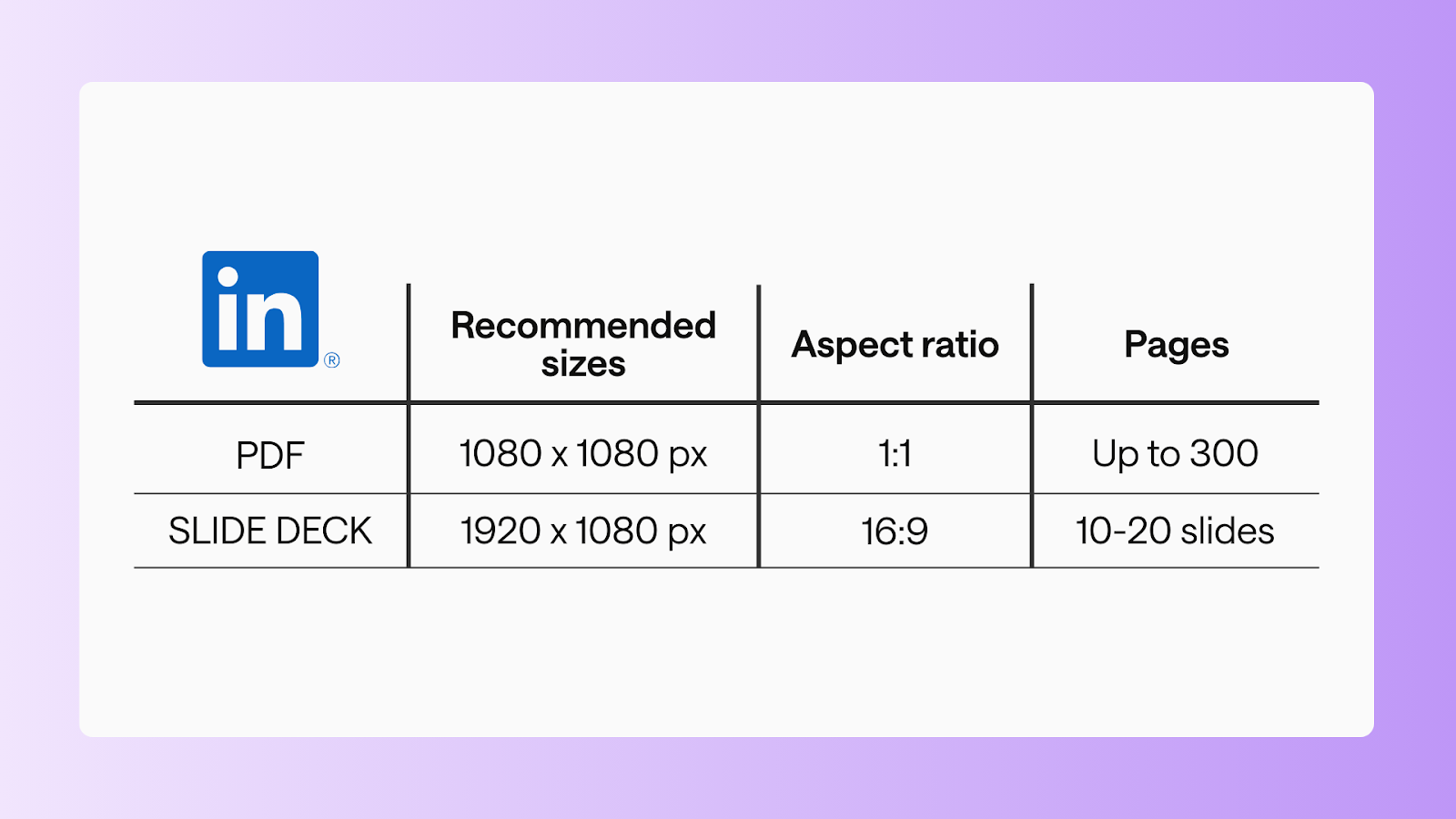
PDF document
- Recommended size: 1080 x 1080 px
- Aspect ratio: 1:1
- Max file size: 100 MB
- Pages: up to 300 pages
Slide deck carousel
- Recommended size: 1920 x 1080 px
- Aspect ratio: 16:9
- Max file size:100 MB
- Pages: 10-20 slides
FAQs
What are the specs for LinkedIn posts?
LinkedIn supports images, videos, banners, and documents/carousels. Each format has recommended dimensions and file limits to ensure your posts display properly on desktop and mobile.
Is 1920x1080 OK for LinkedIn?
Yes! 1920x1080 px is perfect for standard landscape videos and slide decks. Make sure text and logos are centred to avoid cropping on mobile.
Can I post 1920x1080 to LinkedIn?
Absolutely. LinkedIn accepts 1920x1080 px videos and slide decks. Ensure you keep key content within the “safe zone” to display correctly on both desktop and mobile.
What are the rules for LinkedIn posts?
- Use the recommended sizes for images, videos, and documents.
- Add captions to videos.
- Keep text and visuals professional and aligned with your brand.
- Limit carousel/document posts to the maximum number of slides/pages per format.
What is the image size limit for LinkedIn?
- Single images: 5 MB max
- Multiple images: 10 MB each
- Banner/cover images: 4 MB max
Make your LinkedIn posts shine
Bookmark this guide, share it with your team, and next time you post, you’ll know your updates, carousels, and videos are looking their absolute best.
Still paying per seat for your social media tool? With HeyOrca, you get unlimited users – so your whole team (and clients!!) can collaborate without the extra cost. Plan, approve, and schedule your next post now.
Every member of your team deserves a seat at the table. That's why every HeyOrca plan comes with unlimited users. Choose the social media scheduler that helps you create, collaborate, and build community – without worrying about extra fees. Start your free trial.
Build stronger social media communities. HeyOrca brings your whole team together – with unlimited users!! – to plan, approve, and schedule content in one place. See it come together in minutes.
Looking for a social media tool built for teams and agencies? Plan, approve, and schedule your next post in minutes with HeyOrca – no credit card required.
.png)
Close all those tabs
Use HeyOrca to manage your social media content, approvals, and community in one place.
*no card required


.png)
.png)


%20Social%20News.png)
