X (Twitter) media specs & best practices (2026)
Stay up to date with X/Twitter’s post specs for images and videos in 2026. Discover recommended sizes, aspect ratios, and tips to make your content look polished, professional, and scroll-stopping.
Ever notice how some tweets just . . . don’t look right? Maybe the image feels cropped, the text overlaps, or the video looks squished.
Usually, that means the post wasn’t formatted to X’s specs.
When you use the right image sizes, video dimensions, and aspect ratios, your content shows up the way you actually designed it. It looks clean on desktop, crisp on mobile, and polished in a feed that moves fast.
If you want deeper platform-specific tips, check out these guides next:
- Social media post specs (2026)
- LinkedIn social media specs & best practices (2026)
- Facebook posting specs & best practices in 2026
- Instagram media specs & best practices (2026)
- TikTok media specs & best practices (2026)
X (Twitter) best practices in 2026
Let’s walk through the best practices and specs you need to know so your posts show up exactly how you intended.
Design for the preview crop
On X, your image preview matters just as much as the full image. The platform often displays images in a 1.91:1 landscape preview in the timeline. If your key text or visuals are too close to the top or bottom, they may get cut off.
Keep important elements centred and preview your post before publishing.
Choose the right aspect ratio
Different formats behave differently in-feed:
- 1.91:1 (1200 x 628 px) is ideal for link previews and landscape visuals
- 1:1 (1080 x 1080 px) works well for square graphics
- 16:9 (1920 x 1080 px) is great for video content
- 4:5 (portrait) can take up more vertical space on mobile
If your goal is visibility in the feed, slightly taller images (like 4:5) can take up more screen space and stand out more.
Keep visuals clean and readable
Avoid cramming too much text into one image, make headlines bold, keep spacing generous, and ensure fonts are readable on small screens.
Optimize video correctly
Use MP4 format with H.264 compression for best compatibility. Stick to 1080p when possible for a balance of quality and performance.
High-resolution videos are supported — but overly large files may be compressed.
Maintain brand consistency
When someone scrolls past your post, you have maybe a second to register. Consistent colours, fonts, layouts, and visual styles make your content instantly recognizable before someone even reads the caption. Over time, that familiarity builds trust. And trust builds engagement.
If every post looks completely different, it’s harder for people to connect the dots. But when your visuals feel cohesive, your brand starts to stand out naturally in the feed.
Templates make this way easier — especially when you’re posting often. They save time, keep your design consistent, and make sure every post still feels on-brand, even when you’re moving quickly.
Always do a final human check
Before you hit post, take a moment to preview it in the composer. Does the image crop look right? Is the text readable on a small screen? Does it actually feel like your brand?
If you used AI to create the post, always give it a human once-over. Specs get you halfway there, but a careful human review is what makes sure everything lands the way you intended.
X post specs (2026)
X supports single images, multiple images (up to 4 per post), GIFs, and videos.
Image posts
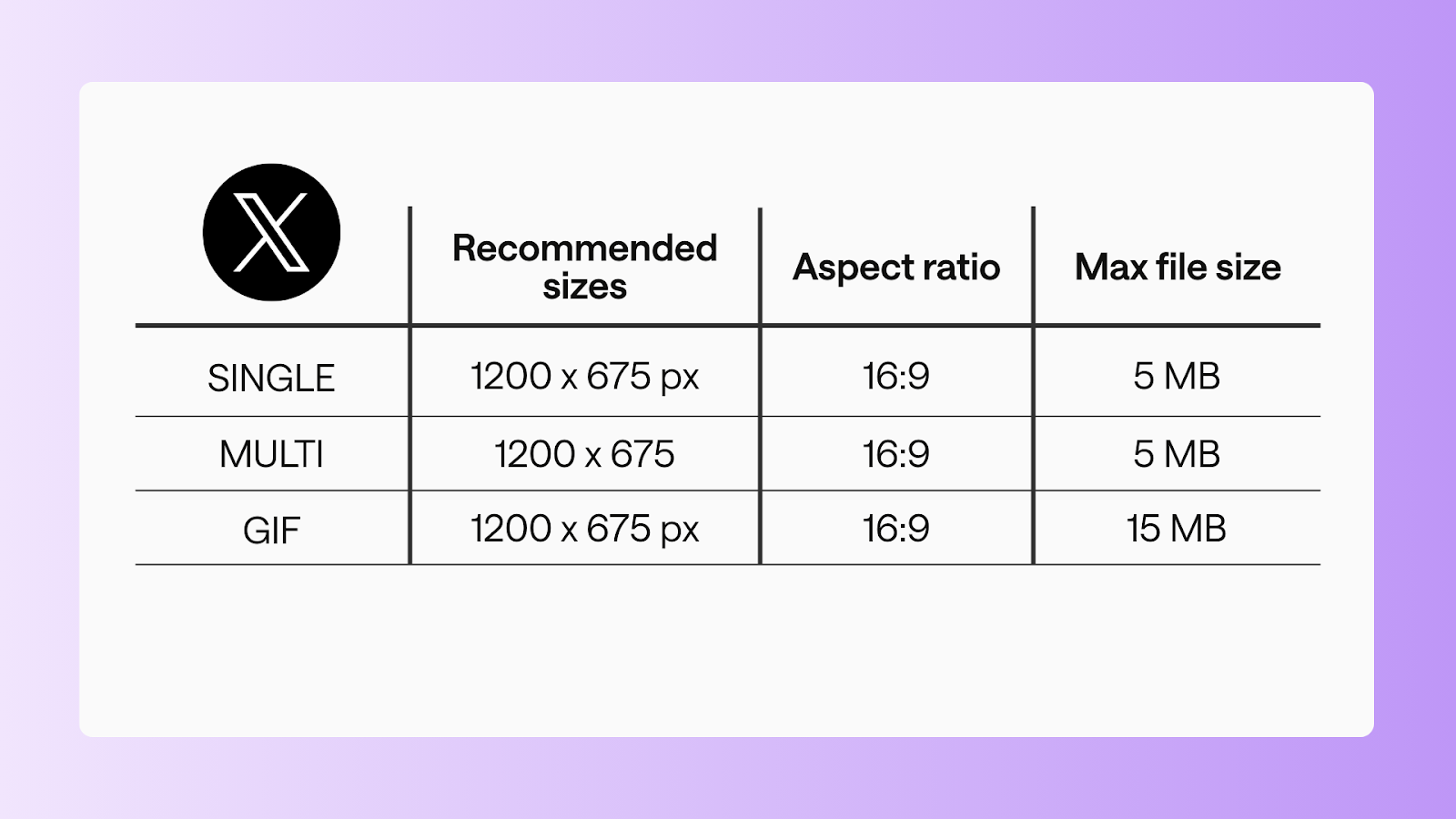
Single image
- Recommended size: 1200 x 675 px
- Aspect ratio: 16:9
- Max file size: 5 MB
Multi-image
- Recommended size: 1200 x 675 px
- Aspect ratio: 16:9
- Max file size: 5 MB each
GIF
- Recommended size: 1200 x 675 px
- Aspect ratio: 16:9
- Max file size: 15 MB
Video posts
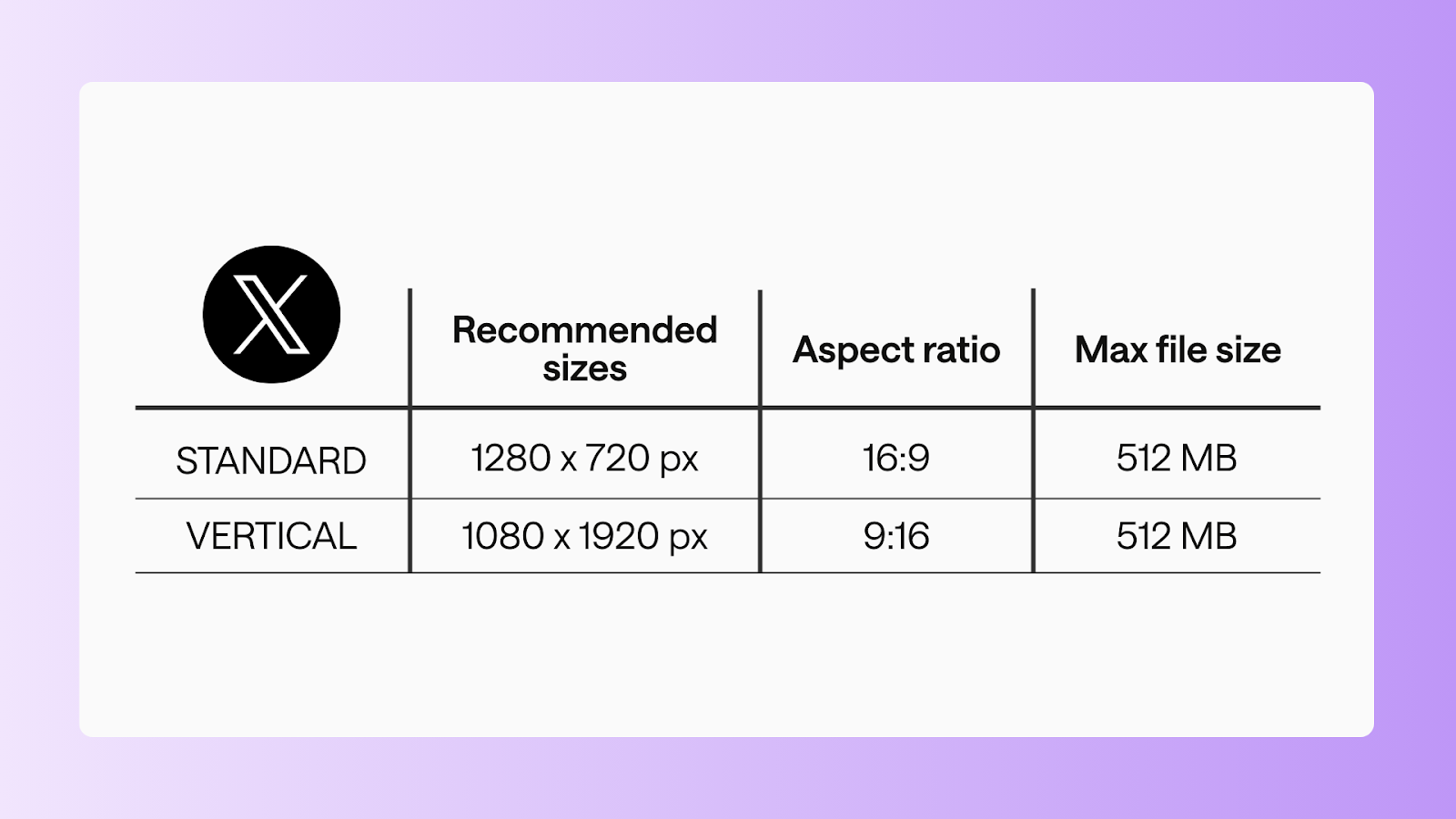
Standard video
- Recommended size: 1280 x 720 px
- Aspect ratio: 16:9
- Max file size:512 MB
- Duration: 0:01-2:20
Vertical video
- Recommended size: 1080 x 1920 px
- Aspect ratio: 9:16
- Max file size: 512 MB
- Duration: 0:01-2:20
FAQs
What is the 1.91:1 aspect ratio on Twitter?
The 1.91:1 aspect ratio (commonly 1200 x 628 px) is the standard landscape format used for link previews and in-feed image displays. It ensures your image appears properly in timeline previews without awkward cropping.
Does Twitter support 1920x1080?
Yes. Twitter (X) supports 1920x1080 (16:9) for video content. It’s one of the recommended resolutions for high-quality video posts.
What aspect ratio works best on X?
- 1.91:1 for link previews
- 16:9 for video
- 1:1 for square graphics
- 4:5 for more vertical feed presence
Why is my image cropped on Twitter?
Cropping usually happens because the preview favours a landscape ratio. If your key elements are too close to the edges, they may not display fully in the timeline.
Make your tweets look sharp in 2026
Posting on X isn’t just about the message — it’s about how it looks, how it performs, and staying current. Use the right specs, keep your visuals clean and readable, and check out our X/Twitter Social News for the latest updates.
Bookmark this guide and share it with your team; it’ll be your go-to reference for X/Twitter media specs in 2026.
Still paying per seat for your social media tool? With HeyOrca, you get unlimited users – so your whole team (and clients!!) can collaborate without the extra cost. Plan, approve, and schedule your next post now.
Every member of your team deserves a seat at the table. That's why every HeyOrca plan comes with unlimited users. Choose the social media scheduler that helps you create, collaborate, and build community – without worrying about extra fees. Start your free trial.
Build stronger social media communities. HeyOrca brings your whole team together – with unlimited users!! – to plan, approve, and schedule content in one place. See it come together in minutes.
Looking for a social media tool built for teams and agencies? Plan, approve, and schedule your next post in minutes with HeyOrca – no credit card required.
.png)
Close all those tabs
Use HeyOrca to manage your social media content, approvals, and community in one place.
*no card required


.png)
.png)


%20Social%20News.png)
