Manage your social media calendar from your phone
It's easier than ever to build a community while you're on the go! Use the HeyOrca mobile app to upload media, create and approve posts, manage your publishing schedule, and more.
The mobile app is FREE with every HeyOrca plan!
.webp)
For social media marketers on the move
Away from your desk? HeyOrca’s mobile app has your back when you’re attending a
conference or event, travelling for work, or grabbing content at a photoshoot.

What can you do with the HeyOrca mobile app?
Turn your media into a scheduled post —
right from your phone!

Collaborate anytime,
anywhere
In the HeyOrca mobile app, you'll see the same comment sections you know from desktop: Internal and Everyone.
Choose Internal to leave feedback for your immediate team or pick Everyone to leave a message for your external stakeholders.

Save content inspo as you scroll
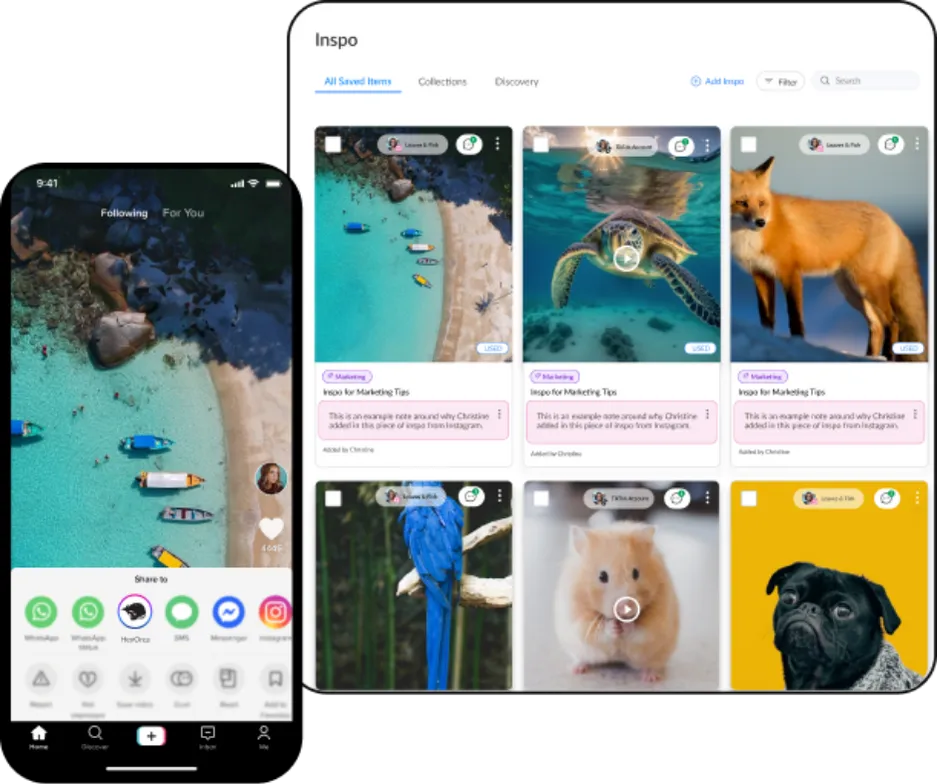
When you scroll across an Instagram reel or TikTok video that inspires you, use the HeyOrca mobile app to send it to your Inspo Library. There, you can see, organize, and search through all the content your team has saved.
Frequently asked questions
Which HeyOrca pricing plan is the mobile app included in?
The HeyOrca mobile app is included in every HeyOrca plan: Solo, Basic, and Pro.
Is the HeyOrca mobile app free?
Yes, the HeyOrca mobile app is free with every HeyOrca plan. Download HeyOrca for iOS or download HeyOrca for Android.
What social networks does the HeyOrca mobile app integrate with?
The mobile app allows for notification publishing for Instagram, Threads, TikTok, and all other placeholder accounts, including X placeholders.
You can also create posts and edit post details including the post stages for all channels on the mobile app. You can assign content approvers for your posts, leave comments for your team, upload and manage media in the library, add and collaborate on inspo content, and view inpso trends.
Which user roles can access the HeyOrca mobile app?
The HeyOrca mobile app is designed for internal users with edit/create permissions. At this time, we recommend external HeyOrca users access HeyOrca via desktop.