Non-profit? Get up to 40% off HeyOrca
Make managing social easy with HeyOrca. Non-profits enjoy 25% off monthly plans and 40% off annual plans.
Non-profit organizations worldwide choose HeyOrca for built-in collaboration tools, unlimited users, and more. Curious about how it works? Let's take a look at how the team at Entrepreneurship for All (EforAll) uses HeyOrca to manage their 43 social media channels.

Plan posts in your content calendar
With HeyOrca, it's easy to visualize your upcoming content. Francia starts by identifying the topics she wants to post about. Then she maps out the posts in her calendar.
Her pro tip? Use draft posts as placeholders while you adjust your content schedule. (Psst! You can also use HeyOrca's Event Strips to mark important events and Social Media Holidays to auto-add regional holidays.)

Plan posts in your content calendar
With HeyOrca, it's easy to visualize your upcoming content. Francia starts by identifying the topics she wants to post about. Then she maps out the posts in her calendar.
Her pro tip? Use draft posts as placeholders while you adjust your content schedule. (Psst! You can also use HeyOrca's Event Strips to mark important events and Social Media Holidays to auto-add regional holidays.)
Add your copy, photos, videos, and GIFs
Francia gets to work on adding creative assets and writing captions. To help with this, she uses HeyOrca's Canva integration and AI caption generator.
Ready to bring your posts to life? HeyOrca makes it easy to experiment with different photos, videos, and GIFs – because every plan comes with unlimited media storage!

Add your copy, photos, videos, and GIFs
Francia gets to work on adding creative assets and writing captions. To help with this, she uses HeyOrca's Canva integration and AI caption generator.
Ready to bring your posts to life? HeyOrca makes it easy to experiment with different photos, videos, and GIFs – because every plan comes with unlimited media storage!
Approve posts before they're published
Wondering how Francia's team ensures their social content is always polished and on brand?
With her content set up in HeyOrca, Francia changes the status of each post to "Awaiting Approval." Then she sends a link to a colleague so they can review everything for clarity and correctness. Her colleague marks each post as "Approved" or "Needs Revision," and sometimes leaves internal comments to share feedback.

Approve posts before they're published
Wondering how Francia's team ensures their social content is always polished and on brand?
With her content set up in HeyOrca, Francia changes the status of each post to "Awaiting Approval." Then she sends a link to a colleague so they can review everything for clarity and correctness. Her colleague marks each post as "Approved" or "Needs Revision," and sometimes leaves internal comments to share feedback.
Copy posts to your other calendars
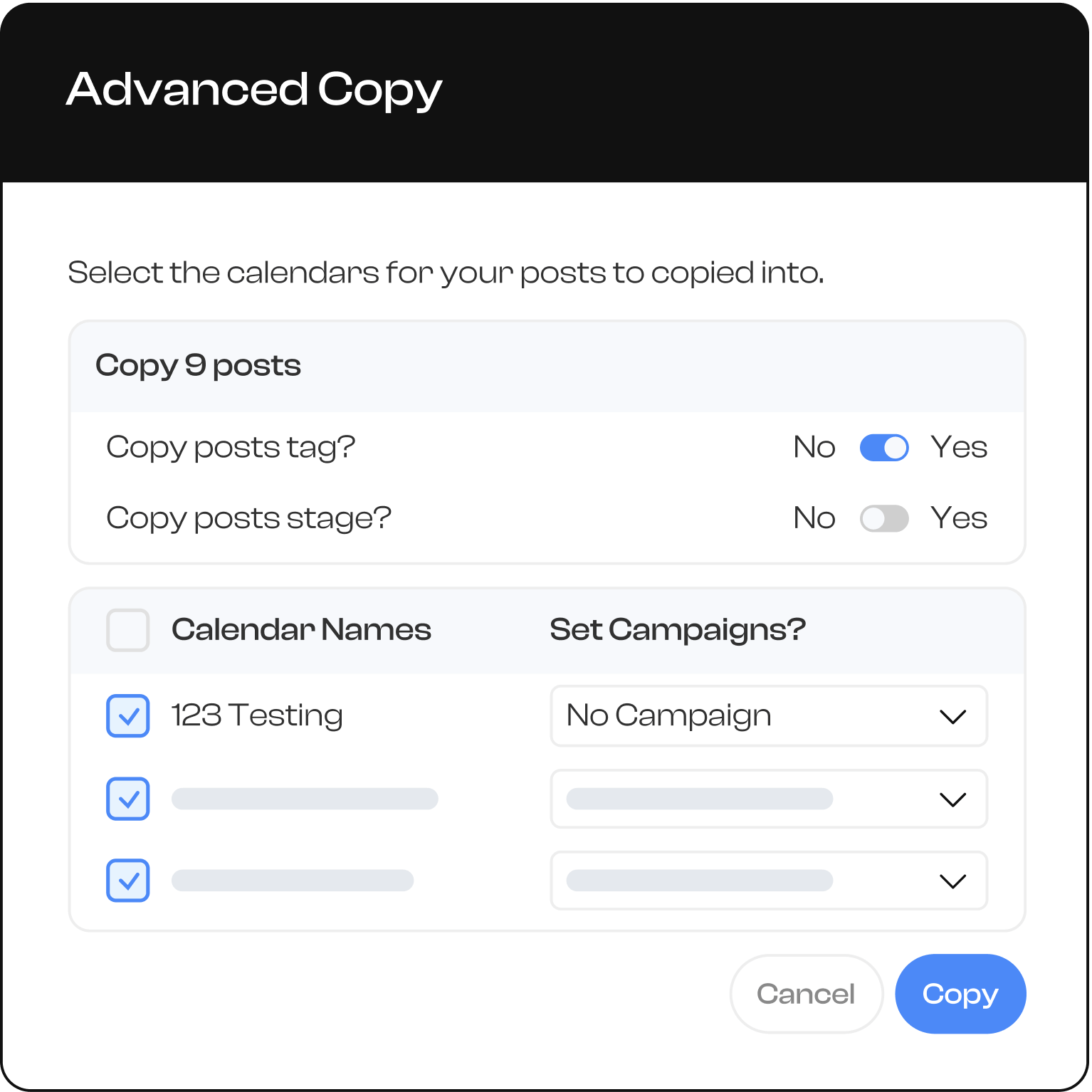
Non-profits often manage multiple social accounts, and EforAll is no exception. Instead of recreating each post for her organization's many channels, Francia simply uses HeyOrca's copy function to duplicate posts across her other content calendars.
Then she updates her wider team on the month's themes and important dates, and she notifies her organization's other social media managers that content is ready for them to work with in HeyOrca.
Copy posts to your other calendars
Non-profits often manage multiple social accounts, and EforAll is no exception. Instead of recreating each post for her organization's many channels, Francia simply uses HeyOrca's copy function to duplicate posts across her other content calendars.
Then she updates her wider team on the month's themes and important dates, and she notifies her organization's other social media managers that content is ready for them to work with in HeyOrca.
3 HeyOrca tools that non-profits love
Francia shared her most-used tools for collaborating with her team and building community.

Copy-to-calendar
“For people who have multiple accounts, this feature is great. It helps me copy everything in bulk. Without it, I’d have to go to each calendar one by one and do the same process 20 times."

Reports
“It’s so much easier than having to go to each app to check on performance. I’m a data-driven person, I like to study results to see what we’re going to do next and I find HeyOrca’s reports really helpful. They also look cute – very friendly to the eye."

AI writing tool
“I’m 100% on the AI train, it’s a great tool for social media marketers that here’s to stay. You just have to use it in a smart way and understand that it’s a tool to use to our benefit. It’s great to have it right in HeyOrca’s platform, so I don’t have to go to another app.”

Manage multiple social media clients all in one place
Frequently Asked Questions
What is approval workflow software?
Approval workflow software helps teams review, approve, and manage content before it's published. Instead of tracking feedback across emails, spreadsheets, and chat apps, teams can keep approvals organized in one place.
How does HeyOrca's approval workflow work?
HeyOrca allows teams and clients to review content, leave feedback, request changes, and approve posts before they go live. Every comment, revision, and approval stays connected to the content being reviewed, making collaboration simple and organized.
Do clients need a HeyOrca account to approve content?
No. Clients can review, comment on, approve, or reject content without creating an account or logging in. You just need to send them an approval link, and they'll be ready to review.
Can I set up internal and client approval workflows?
Yes. Many teams use HeyOrca to gather internal feedback before sending content to clients for final approval. This helps catch issues early and keeps content moving smoothly through the review process.
Can multiple people review and approve content?
Absolutely! Social media content often requires feedback from account managers, designers, marketing leaders, and clients. With unlimited users included on every HeyOrca paid plan, you can involve the right stakeholders without worrying about additional seat costs.
Why use approval management software for social media content?
Social media moves quickly, and missed feedback can lead to publishing errors, delays, or unnecessary stress. Approval management software creates a clear review process, so your team can collaborate efficiently, publish confidently, and keep clients informed every step of the way.