SEO and AEO for Social Media Managers

Learn how social media managers can improve SEO and AEO with practical tips for keyword research, blog optimization, AI search, FAQs, alt text, and more.
Search isn't what it used to be.
Sure, people still Google things. But they're also asking ChatGPT, Gemini, Claude, Perplexity, and Google's AI Overviews for recommendations, explanations, and quick answers.
That means showing up on page one of Google isn't the only goal anymore. If you want your content to stay discoverable, you also need to create content that AI can understand, trust, and reference.
The good news? You don't need to learn a completely new strategy. If you've already invested in SEO, you're well on your way because good AEO starts with good SEO.
Let's walk through what that actually looks like.
What is SEO?
SEO (Search Engine Optimization) helps search engines understand what your content is about so they can show it to the right people.
Every time you publish a blog, landing page, or guide, Google is trying to answer a few simple questions:
- What is this page about?
- Can I trust this information?
- Is this the best answer for someone's search?
The easier you make those questions to answer, the more likely your content is to appear in search results.
What is AEO
Answer Engine Optimization (AEO) is about helping AI-powered search tools understand and reference your content when answering questions.
Instead of showing someone a list of links, AI search experiences generate answers by pulling together information from trusted sources across the web.
That might include:
- Company websites
- Blogs
- Documentation
- News articles
- Reddit discussions
- Public social posts
- Structured data
The clearer, more helpful, and more trustworthy your content is, the better your chances of becoming one of those sources.
Why SEO is still the foundation of AEO
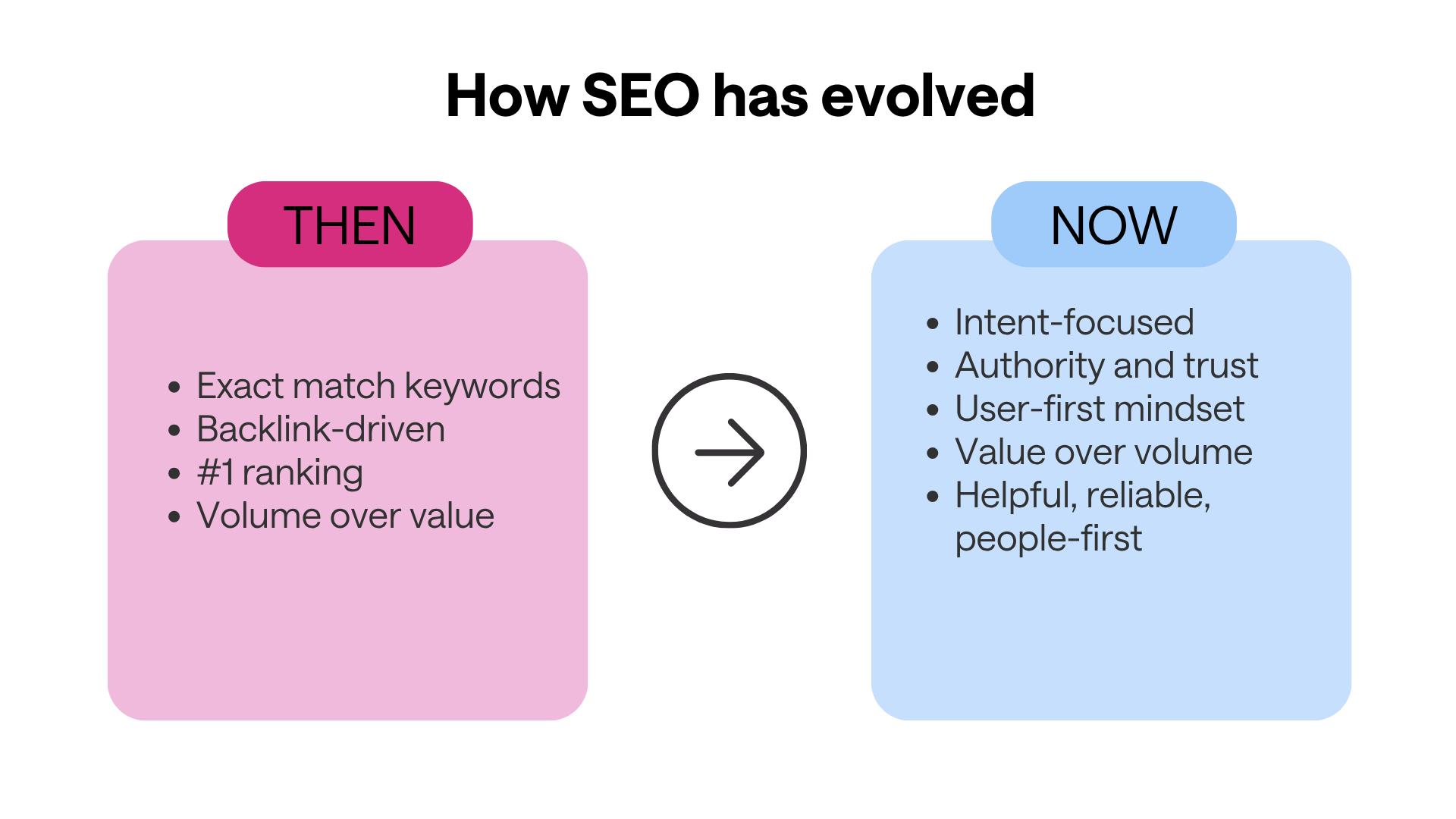
You've probably heard someone say, "SEO is dead."
We don't buy it.
Search isn't disappearing, it's evolving.
Think of SEO as the foundation of a house. AEO is everything you build on top of it. Without a strong foundation, nothing else lasts.
The journey usually looks like this:
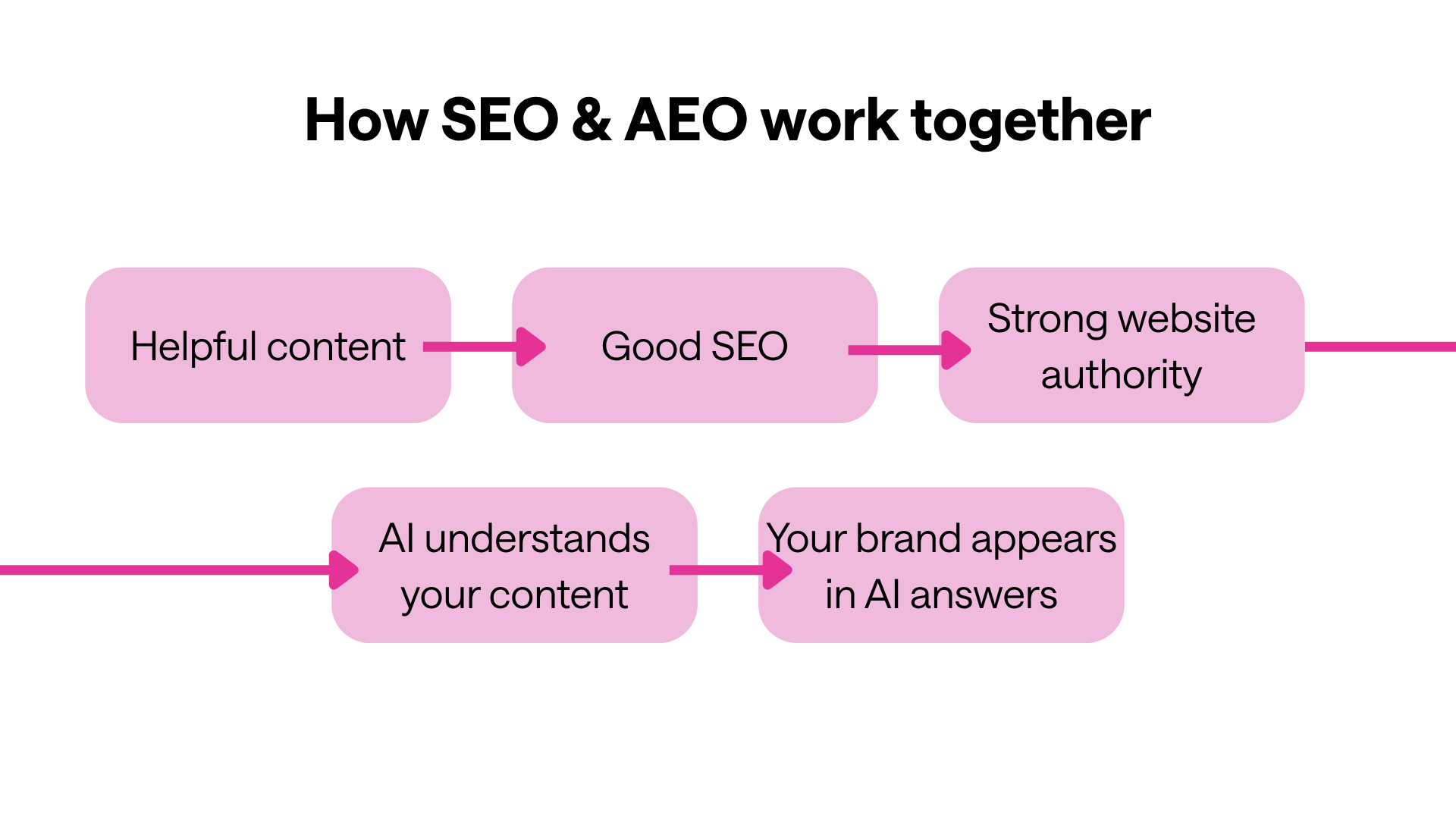
In other words, you can't have good AEO without good SEO.
10 practical SEO and AEO tips every social media manager should use
Psst! If you’re looking for the best free SEO and AEO tools, we’ve got you!
1. Start with keyword research
We've all had blog ideas we thought people were searching for.
Sometimes we're right.
Sometimes . . . not so much.
Before you start writing, spend a few minutes doing keyword research. It helps you understand what your community is actually searching for – not what you think they're searching for.
Look for a mix of:
- High-volume keywords
- Long-tail keywords
- Question-based searches
Those keywords become the foundation of your blogs, landing pages, videos, and even your social content.
Orca tip: Look for keywords with a difficulty score under 49%. If you can find opportunities in the green range (under 29%), even better.
2. Build your content around one main topic
It's tempting to write one article that answers every possible question.
Resist the urge!
Every page should focus on one primary topic.
Once you've finished writing, go back and naturally weave in your supporting keywords. It's much easier than trying to force them into every paragraph while you're drafting.
Orca tip: Rank your keywords in your sheet with KD% and volume, then add the best 5 to the tool. Review the pillar page and recommendations.
3. Make your headings easy to understand

Headings aren't just there to organize your content; they are incredibly important to help search engines and AI understand it too.
Aim to:
- Use one H1
- Structure H2s and H3s logically
- Keep headings concise
- Include keywords naturally
Question-based headings often perform particularly well because they mirror how people search.
4. Answer the questions your community is already asking
One of the easiest ways to improve both SEO and AEO is by answering real questions.
Include up to six FAQs near the end of every article using short, direct answers.
These can improve your chances of appearing in featured snippets and AI-generated responses.
One of our favourite tools to find FAQs is AlsoAsked. It helps you uncover follow-up questions people search for after their initial Google query.
5. Add internal and external links
Think of links as little breadcrumbs for search engines.
Internal links help Google discover more of your content.
External links help build trust by showing where your information comes from.
As a general rule:
- Link to relevant pages on your own website.
- Link to trusted sources when citing research or statistics.
- Avoid linking to direct competitors.
6. Don't forget your images
Images do more than make your blog look nice.
They help explain concepts, improve accessibility, and give search engines more context.
Whenever possible:
- Use original images.
- Add GIFs when they genuinely help explain a process.
- Write descriptive alt text for every image.
If writing alt text isn't your favourite task (we get it), an AI-powered alt text generator – like the one in HeyOrca – can help speed things up.
Orca tip: You can also install an Alt Text Checker extension to see if your alt text is on your pages or not.
7. Audit your website regularly
Technical SEO can feel overwhelming, but it doesn't have to.
Start with the biggest issues first.
If you're using a site audit tool like Semrush, don't panic over every warning or notice. Depending on your website platform, some recommendations can be false positives.
Focus on fixing the major technical errors before tackling everything else.
8. Refresh your existing content
One of the easiest SEO wins isn't creating something new – it's actually improving something you've already published.
Every few months, revisit your top-performing articles and:
- Update screenshots
- Refresh statistics
- Add new examples
- Improve internal links
- Expand your FAQs
- Add any new keywords you've discovered
Fresh content sends positive signals to both search engines and AI.
9. Use your social content beyond social media
Some of your best blog ideas already exist.
Repurpose:
- LinkedIn posts
- Instagram carousels
- Webinar takeaways
- Community questions
- Newsletter content
into evergreen blog posts.
Likewise, every blog can become multiple social posts.
Orca tip: One great idea should work across multiple channels!
10. Write for people first
If you only remember one thing from this article, make it this:
Write for your community first. Optimize for search second.
Search engines – and AI – are getting much better at recognizing genuinely helpful content.
That means your experience, examples, and unique perspective matter more than ever.
SEO isn't dead. It's evolved.
You still need a strong foundation before you build the house. And while you're optimizing for algorithms, don't forget who you're really creating for: people.
Commons SEO and AEO mistakes
Before you hit publish, make sure you haven't fallen into one of these common traps:
- Writing for algorithms instead of people
- Publishing generic AI-generated content
- Ignoring FAQs
- Forgetting to update older articles
- Using weak heading structures
- Missing internal links
- Not demonstrating expertise
- Creating content nobody is searching for
FAQs about SEO and AEO
What's the difference between SEO and AEO?
SEO helps webpages rank in search engines, while AEO helps AI-powered search tools understand and reference your content when answering questions.
Can AI replace SEO?
No. Strong SEO is the foundation that helps AI understand and trust your content.
Why are FAQs good for SEO?
FAQs answer common questions directly, which can improve your chances of appearing in featured snippets and AI-generated responses.
Does alt text help SEO?
Yes. Alt text improves accessibility while helping search engines understand what your images show.
How often should I update blog posts?
Review important articles every 6–12 months or whenever there are major industry or platform changes.
What's the best SEO tool for beginners?
Google Search Console is one of the best free places to start because it shows how people are already finding your website.
Next steps
Don't feel like you need to overhaul your entire content strategy overnight.
Start with one article.
Refresh the headings, add FAQs, improve your internal links, and update your images with descriptive alt text.
Small improvements add up, and they're often enough to help both search engines and AI better understand your content.
Most importantly, keep creating content that's genuinely useful for your community. Because while search continues to evolve, helpful content never goes out of style.
Still paying per seat for your social media tool? With HeyOrca, you get unlimited users – so your whole team (and clients!!) can collaborate without the extra cost. Plan, approve, and schedule your next post now.
Every member of your team deserves a seat at the table. That's why every HeyOrca plan comes with unlimited users. Choose the social media scheduler that helps you create, collaborate, and build community – without worrying about extra fees. Start your free trial.
Build stronger social media communities. HeyOrca brings your whole team together – with unlimited users!! – to plan, approve, and schedule content in one place. See it come together in minutes.
Looking for a social media tool built for teams and agencies? Plan, approve, and schedule your next post in minutes with HeyOrca – no credit card required.
.png)
Close all those tabs
Use HeyOrca to manage your social media content, approvals, and community in one place.
*no card required


