How to manage social media on the go
Learn how to manage social media on the go, from checking scheduled posts and downloading content to keeping up with social conversations on your phone.
TL;DR
- Review upcoming posts, approvals, and publishing statuses across your client calendars.
- Download creative assets and save captions somewhere accessible so you can find them when you need them.
- Use social media management apps like HeyOrca to access your Social Inbox and keep up with social conversations on the go.
- Check post statuses and use mobile notifications to stay informed about relevant activity.
- Build short check-ins into your day so you can stay organized without feeling like you need to be available around the clock.
Managing social media on the go comes with its own set of challenges. You need access to your content, a way to keep track of what's happening across client accounts, and time to connect with your community – all without being glued to your desk.
The good news? You don't have to wait until you're back at your computer to keep things moving. With a mobile app, you can take some of your everyday social media tasks with you.
Here are a few ways to make managing social media on the go easier, with a little help from the HeyOrca mobile app.
1. Check your content calendar before the day gets busy
When you're managing multiple brands or clients, keeping track of what's going live and when can feel like a job in itself.
Before heading out for the day, take a look at your upcoming content. Check what's scheduled, see which posts are still awaiting approval, and flag anything that needs your attention.
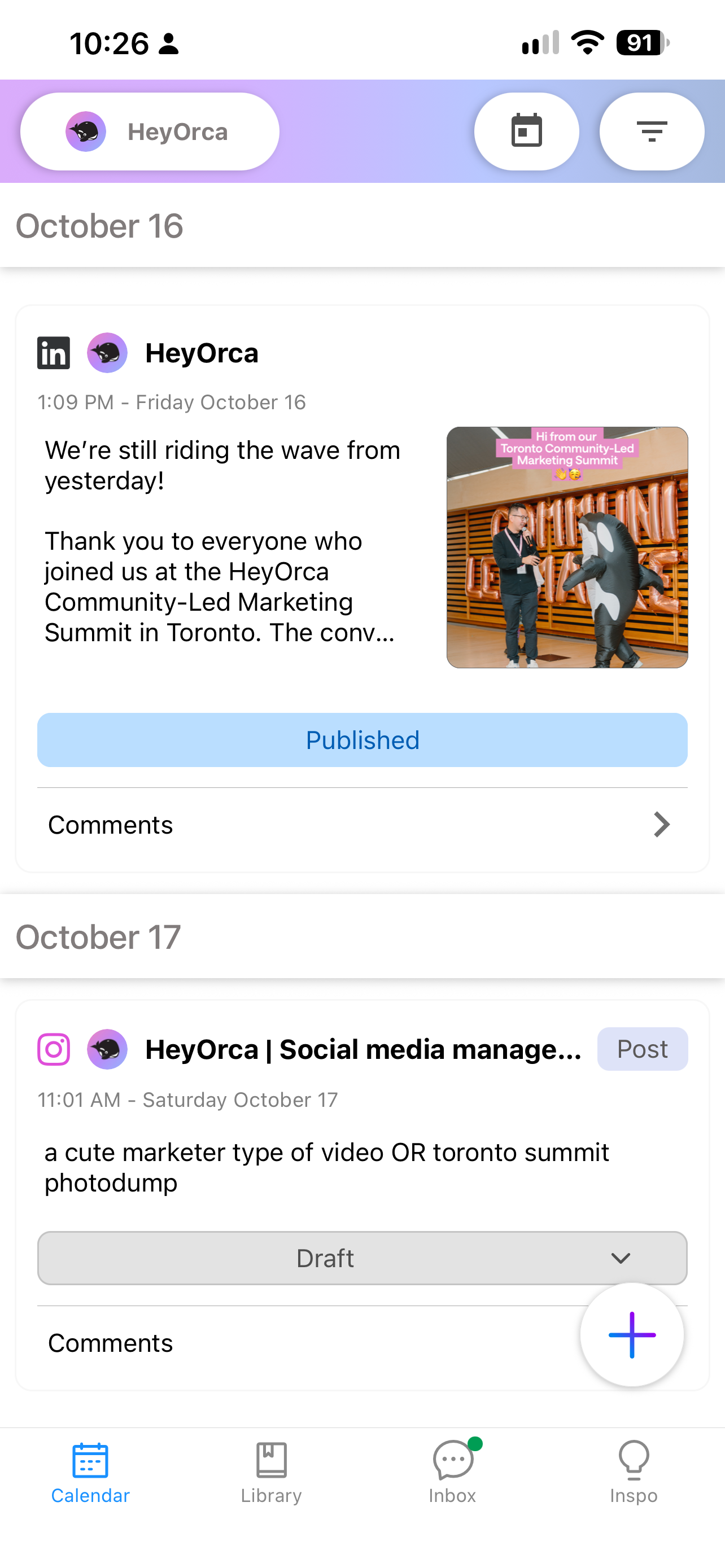
How the HeyOrca mobile app helps: You can view posts across your selected calendars, check their statuses, and filter content by date and client. So, if someone asks about next week's Instagram post while you're away from your desk, you can find it without digging through your emails or opening your laptop.
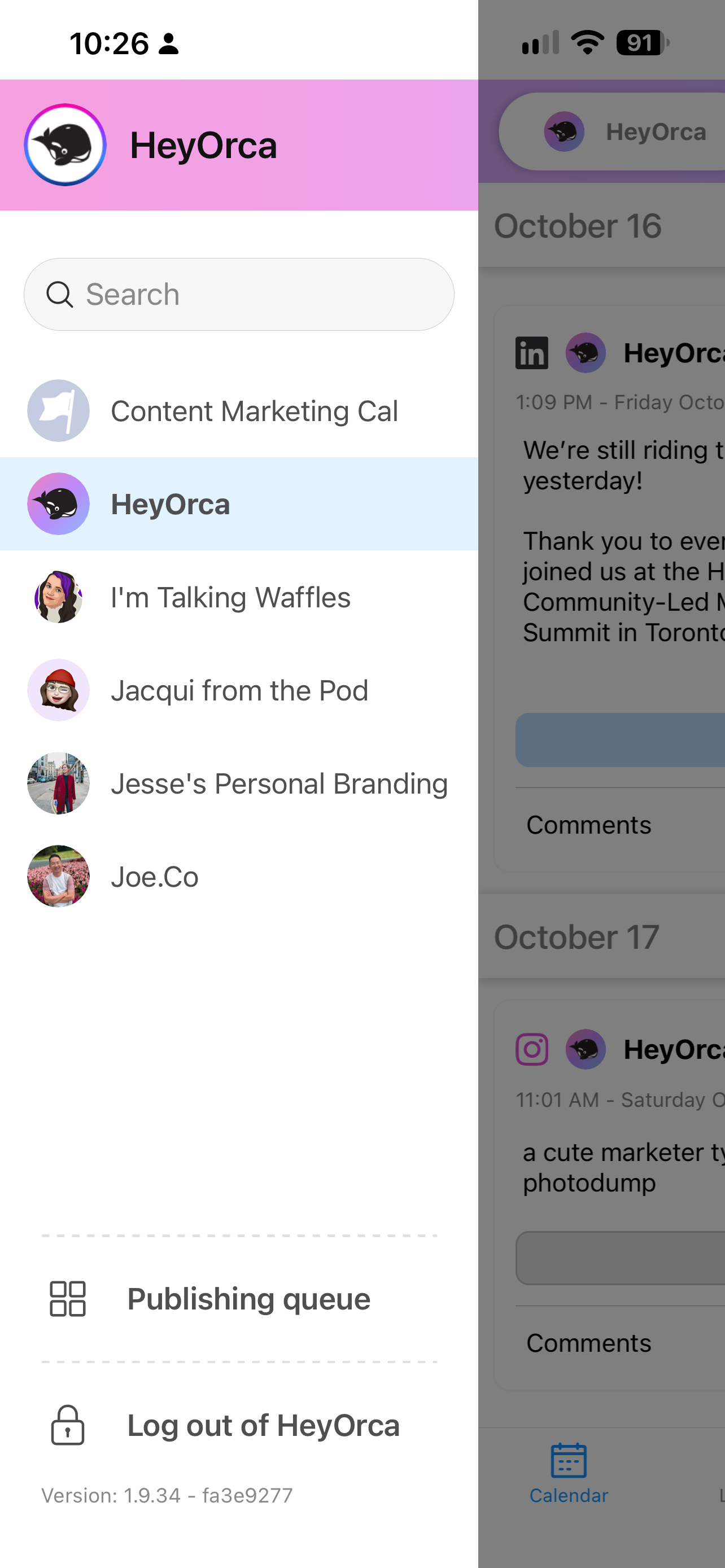
To change which calendar you're viewing, select the left hand sidebar to open up the calendar selection menu.
2. Keep your content and creative assets within reach
You never know when you might need to reference a caption, grab an image, or find a piece of content you've already prepared.
Keeping your content accessible on your phone can save you from searching through folders, messaging teammates for files, or trying to recreate something you've already made.
A few ways to prepare:
- Download important images or graphics before you need them.
- Keep approved captions easy to find.
- Check post details when you need to confirm what's planned.
How the HeyOrca mobile app helps: You can open posts from your mobile calendar, download their assets to your device, and copy captions with a tap. It's a handy way to access content you've already planned without starting from scratch.
One thing to keep in mind: downloading a post doesn't automatically copy its caption or open the social platform where it will be published, so you'll need to handle those steps separately.
3. Make time for community management, even when you're out
Comments, messages, and other social interactions can pop up throughout the day. While you don't need to respond to every notification the second it arrives, having a routine for checking in helps you stay connected to the people engaging with your brand.
Try setting aside a few small windows during the day to catch up on social conversations. You could check in after your morning meetings, during a break, or before wrapping up for the day.
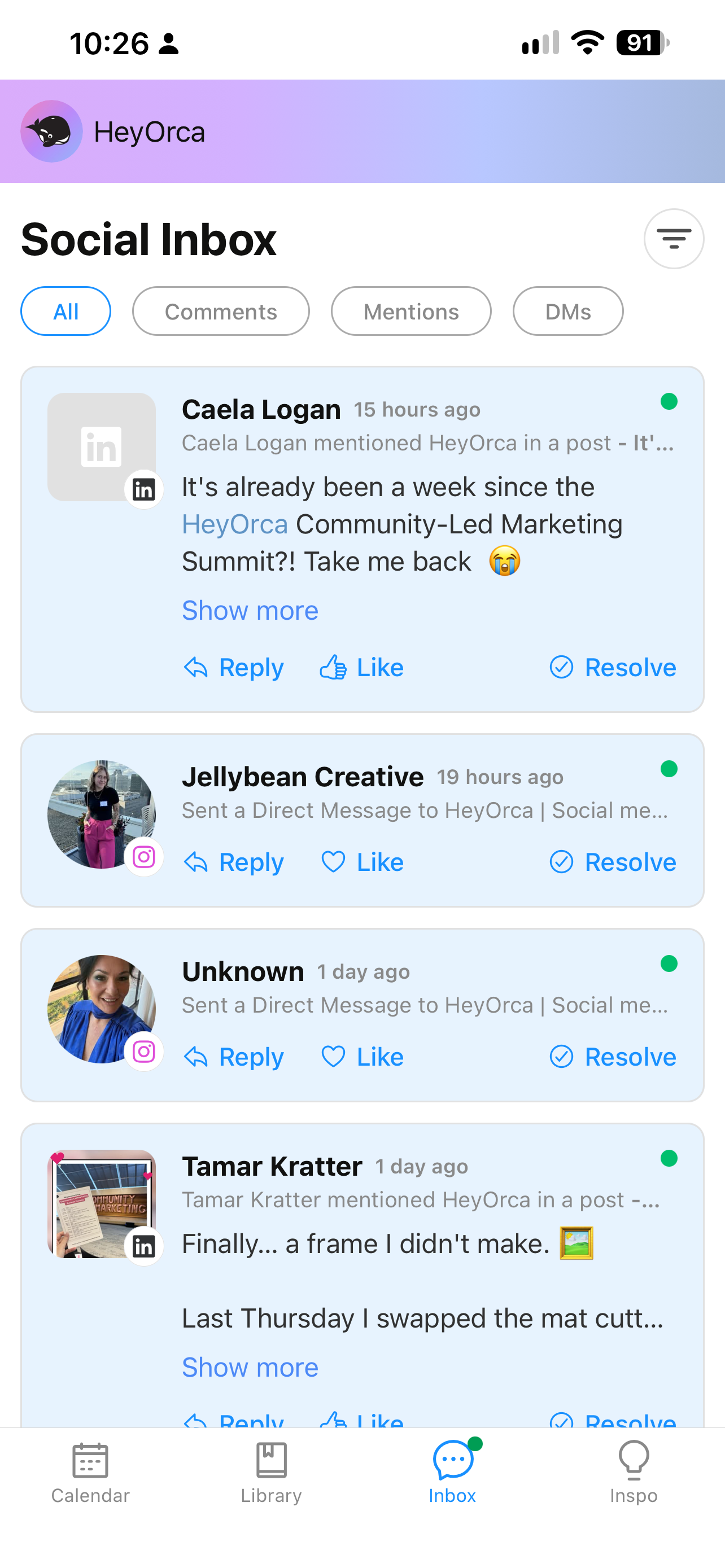
How the HeyOrca mobile app helps: Social Inbox is available in the mobile app, giving you another way to access social conversations while you're away from your computer. You can fit community management into your day without needing to return to your desk every time you want to check in.
4. Stay on top of approvals and publishing tasks
Social media rarely runs on one person's schedule. A post might need a client's approval, a teammate might have a question, or something might not publish as expected.
When you're away from your computer, it helps to have visibility into what's happening so you can plan your next steps.
Make a habit of checking your content's status when you review your calendar. That way, you can spot posts awaiting approval, identify content that needs revisions, and keep an eye out for failed posts.
How the HeyOrca mobile app helps: You can check the status of posts in your selected calendars, including drafts, approved content, posts awaiting approval, and other available statuses. Mobile notifications can also help you stay informed about relevant activity and content designated for mobile publishing.
5. Build a mobile-friendly social media routine
Managing social media on the go doesn't mean you need to be available around the clock. In fact, having a simple routine can help you stay organized without feeling like you need to check your phone every five minutes.
Here are a few habits worth trying:
- Review upcoming content and flag anything that needs attention.
- Check a post's status or find an asset when you have a few minutes to spare.
- Decide when you'll check in rather than feeling pressure to respond to every alert immediately.
- Build short Social Inbox check-ins into your day.
- Your phone is great for quick checks and on-the-go tasks, but some work is still easier to tackle on a larger screen.
Frequently asked questions
How do you manage social media on the go?
To manage social media on the go, use a mobile app to check your content calendar, review upcoming posts, access creative assets, and keep up with social conversations.
Can you manage social media from your phone?
Yes! Many everyday social media tasks can be handled from your phone, including reviewing scheduled content, checking post statuses, downloading assets, and responding to social conversations. Social media management apps like HeyOrca can bring several of these tasks together, so you don't have to switch between multiple tools to stay organized.
What should you look for in a social media management app?
Look for features that fit your workflow, such as a mobile content calendar, post previews, asset downloads, caption copying, notifications, and access to social conversations. If you manage multiple brands or clients, the ability to switch between calendars and workspaces can also help you stay organized.
How can you manage social media conversations from your phone?
Set aside time throughout the day to check comments, messages, and other social interactions. Social media management apps like HeyOrca offer mobile access to tools such as Social Inbox, making it easier to keep up with conversations while you're away from your computer.
How do you manage multiple social media accounts while travelling or away from your desk?
Start by reviewing your content calendar and flagging posts that need approval or attention. Keep important assets and captions accessible, and check social conversations at planned intervals. A social media management app like HeyOrca lets you view multiple client calendars can help you keep track of your workload without needing to open your laptop.
How often should you check social media when you're away from your desk?
IRather than checking constantly, try setting aside a few short windows throughout the day to review content and respond to social conversations. Adjust your routine based on your clients' response expectations and the urgency of incoming messages.
Manage social media wherever your day takes you
A busy day doesn't have to mean losing track of your content or putting community conversations on hold.
With a little planning and the right tools, you can check your calendar, find content, download assets, copy captions, and access Social Inbox from your phone. The HeyOrca mobile app gives you another way to stay connected to your social media workflow, wherever the day takes you.
Want a step-by-step guide to viewing content and navigating calendars? Visit our help centre guide to the HeyOrca mobile app.
Still paying per seat for your social media tool? With HeyOrca, you get unlimited users – so your whole team (and clients!!) can collaborate without the extra cost. Plan, approve, and schedule your next post now.
Every member of your team deserves a seat at the table. That's why every HeyOrca plan comes with unlimited users. Choose the social media scheduler that helps you create, collaborate, and build community – without worrying about extra fees. Start your free trial.
Build stronger social media communities. HeyOrca brings your whole team together – with unlimited users!! – to plan, approve, and schedule content in one place. See it come together in minutes.
Looking for a social media tool built for teams and agencies? Plan, approve, and schedule your next post in minutes with HeyOrca – no credit card required.

Close all those tabs
Use HeyOrca to manage your social media content, approvals, and community in one place.
*no card required


.png)