How to manage 5+ clients at your social media marketing agency

Managing 5+ social media clients? Here are 5 tips to help you stay organized and scale your agency.
It’s an exciting time to be part of a social media marketing agency. Social media platforms are continually innovating and companies are understanding more and more how important social media is to build community and brand.
As you grow your client list, you may be faced with a few growing pains when it comes to productivity and efficiency.
Luckily, we’ve got 5 tips to help you stay ahead and easily manage your social media clients.
1. Use an agency/client contract to define deliverables and set clear expectations
Every social media client will come to your agency with different needs. Maybe that’s a one-time set-up of a social platform, a social strategy which the client prefers to implement in-house, or even a client who wants you to do everything on a retainer model.
Whatever the opportunity, it’s best to get it on paper to avoid any miscommunications about deliverables, contact points, and more.
In your social media contract, you’ll want to cover scope of work, fees and expenses, timeline and termination clauses, ownership of work, confidentiality, and expectations. Make sure it’s signed by both parties before the work begins.
There are plenty of free templates out there to start with. It also doesn’t hurt to consult a legal team to make sure you’ve covered your bases.
2. Have a detailed client onboarding process in place
For a social media marketing agency and client to work together successfully, you’ll need a solid onboarding flow in place.
The first step is to make sure your new client is CRM official. Whether your agency uses HubSpot, HighLevel, Pipedrive, or another CRM option, make sure your client is added so have a centralized location to log interactions and requests.
While you’re at it, assign your client an account manager so they always have a point of contact. You may also choose to send your client a welcome message, which can range from a simple email to a fancy gift basket.
Now, it’s time to collect information. Send a client onboarding questionnaire or book a call to collect important information like marketing goals, social accounts, payment information, and more.
While you’re waiting for this information, add your client to any software your agency uses to be more efficient, like a social media management tool, Slack, Dropbox, Stripe, or Canva.
Finally, schedule a kick-off meeting to clarify expectations, answer questions, and discuss next steps. Part of this call should be going over communication expectations and scheduling your next follow-up.
3. Use an all-in-one social media scheduler and management tool
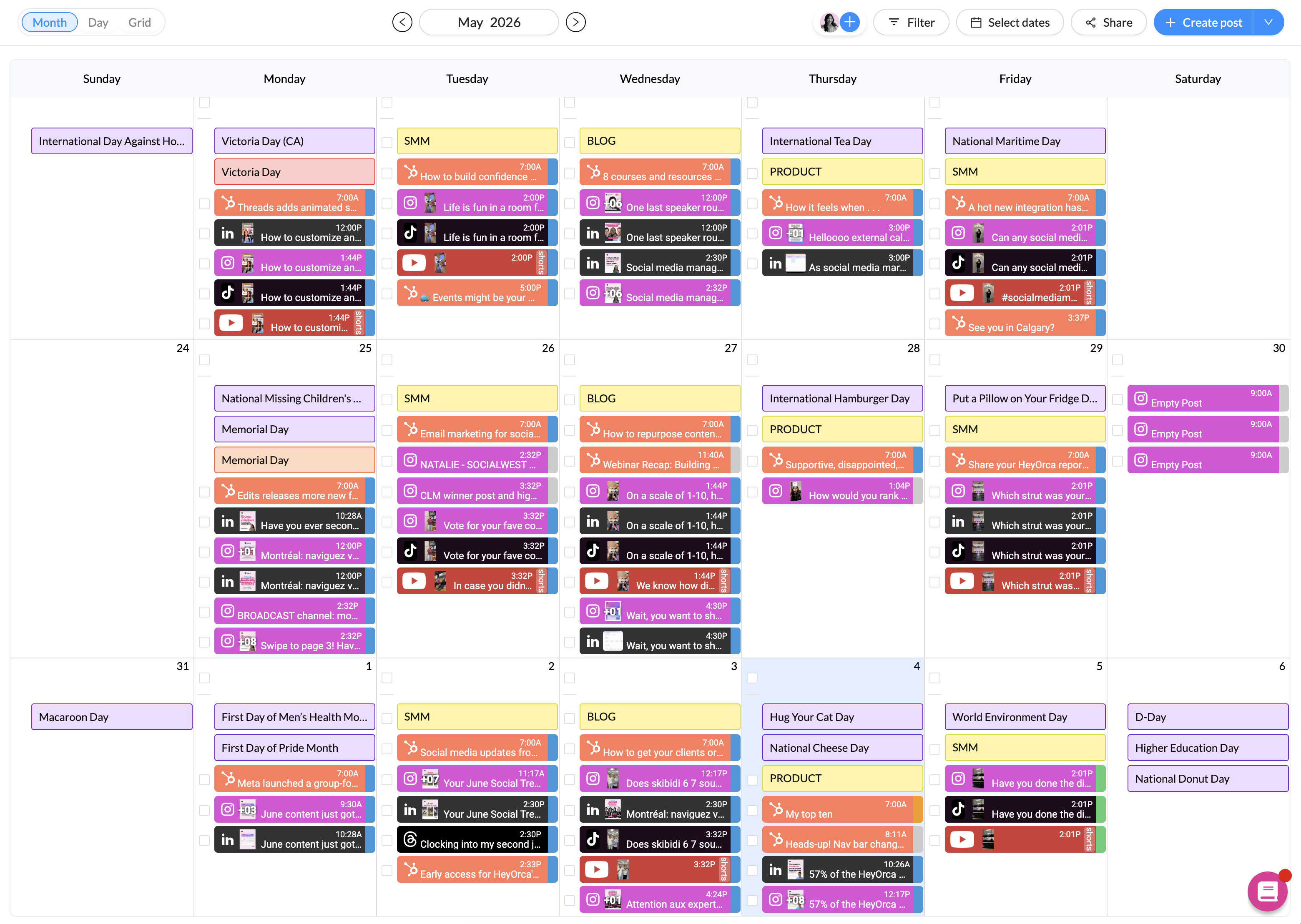
A comprehensive, agency-centric social media scheduler will be your best friend.
What makes a social media scheduler agency-centric? It should be easy to use for both your two main stakeholders: your team and your clients.
Here are a few key features to look out for:
Unlimited users

Many social media schedulers on the market price their software by the number of users. So while the original sticker price might look great, you’ll quickly run a large bill when you add your current team members or grow your agency’s headcount.
For example, Sprout Social prices per user, meaning you can expect to pay $199/user/month. Hootsuite, another social media scheduler, has strict user limits (without an option to pay more) unless you’re on their enterprise plan.
There are ways to work around this, like creating shared accounts and passwords. But the more financially- and security-friendly option is to opt for a scheduler like HeyOrca which provides unlimited free users from the get-go on every plan.
Social platform integrations
A scheduler needs to connect to the social media platforms that your clients are using.
Otherwise, you’ll find yourself flipping between web browser tabs all day.
Choose a scheduler like HeyOrca that integrates with all the leading social media platforms like Facebook, Instagram, LinkedIn, Mailchimp, Pinterest, Threads, and TikTok.
Clear approval process
Most clients prefer to sign off on content before it goes live. Instead of balancing emails and spreadsheets to get that approval, choose a scheduler with a built-in approval process, like HeyOrca.
The best social media mangement tool will allow you to draft content, collaborate on feedback, and set final approved versions live all in one place – without upcharging you every time a new user takes part in the process.
Automated reporting
Reporting and analytics are necessary to show your worth, make decisions, and build your community. But it can become a time-consuming task to visit each platform individually to see how it’s doing.
Choose a social media scheduler like HeyOrca that automates reports straight to your or your client’s email at whatever frequency you need.
Easy client organization
Finally, the best social media schedulers are the ones where you can avoid the panicked “Omg, did I just post to the wrong client’s account?” moments.
At HeyOrca, each client’s content, from their media libraries, social profiles, and social inboxes, are contained in one place.
4. Centralize communication and clarify expectations
The best social media marketing agency and client relationships are based on clear communication.
After you’ve onboarded the client onto whichever software you’ll be using to communicate (covered in tip #2), it’s now time to align on frequency, method, and response rate time.
Communication frequency will be different for everyone and will depend on the work you’re doing together.
If you’re working on a retainer model, you may opt for weekly updates on results and project progress. But if you’re working with a project-based model, you might choose to do updates on every deliverable instead.
Once you figure out a frequency, then decide which method you’ll use. Ask yourself:
- Which updates require a meeting?
- Which updates require a Slack message?
- Which updates should be done with your project management software?
Finally, determine an appropriate response rate. Response rates demonstrate attentiveness, reliability, and professionalism.
But it doesn’t mean that you need to reply instantly. Determine a response rate that works for your agency. You may even consider having an “emergency response rate” and “day-to-day response rate” just in case.
5. Keep looking for areas of improvement
We wish we could say that once you solve client management inefficiencies once, that they’ll go away for good. But, even the most successful and well-established agencies encounter operational hurdles from time to time.
The key is to adopt a culture of continuous improvement, innovation, and adaptation. You may also choose to seek external expertise or consulting services to provide fresh perspectives and solutions to complex problems.
And, don’t hesitate to reach out to other social media managers to get their advice.
FAQs
How to manage a lot of clients as a social media manager?
To manage a lot of clients as a social media manager, you need clear systems for onboarding, scheduling, approvals, and reporting. Many agencies use a social media management tool like HeyOrca to keep everything organized in one place, so workflows stay consistent as client volume grows.
How to improve client management in a social media agency?
To improve client management in a social media agency, focus on creating consistent processes for communication, approvals, and content planning. Tools like HeyOrca help centralize feedback and approvals, reducing back-and-forth and keeping clients aligned from the start.
How many clients can a social media manager handle?
The number of clients a social media manager can handle depends on workload, services offered, and how efficient their systems are. With structured workflows and tools like HeyOrca, managers can streamline repetitive tasks and support more clients without sacrificing quality.
What tools help manage multiple social media clients?
Tools that help manage multiple social media clients usually include CRM platforms like HubSpot and Pipedrive, plus scheduling and approval tools like HeyOrca, Sprout Social, and Hootsuite.
These tools help agencies centralize planning, collaboration, and reporting so nothing gets lost across clients.
How do you streamline social media approvals with clients?
To streamline social media approvals with clients, use a centralized workflow instead of email threads or spreadsheets. Platforms like HeyOrca allow clients to review, comment, and approve content in one place, which speeds up feedback loops and reduces miscommunication.
What is the best way to stay organized when managing multiple clients?
The best way to stay organized when managing multiple clients is to standardize your workflows across every account. Many agencies use tools like HeyOrca to centralize content calendars, approvals, and reporting so every client follows the same structured system.
Summary
With a clear contract, onboarding process, and communication strategy, as well as a comprehensive and agency-centric social media scheduler, you’re now able to tackle 5+ clients.
If you’re looking for an agency-friendly social media scheduler, don’t hesitate to book a demo with HeyOrca’s account managers to see if we’ll make a good fit.
Still paying per seat for your social media tool? With HeyOrca, you get unlimited users – so your whole team (and clients!!) can collaborate without the extra cost. Plan, approve, and schedule your next post now.
Every member of your team deserves a seat at the table. That's why every HeyOrca plan comes with unlimited users. Choose the social media scheduler that helps you create, collaborate, and build community – without worrying about extra fees. Start your free trial.
Build stronger social media communities. HeyOrca brings your whole team together – with unlimited users!! – to plan, approve, and schedule content in one place. See it come together in minutes.
Looking for a social media tool built for teams and agencies? Plan, approve, and schedule your next post in minutes with HeyOrca – no credit card required.

Close all those tabs
Use HeyOrca to manage your social media content, approvals, and community in one place.
*no card required


.png)